Showing posts with label article. Show all posts
Showing posts with label article. Show all posts
This post explains, how to embed(insert) a youtube video in your blogger blog:
So,you want to embed a video(movie) onto your blog.The process is very simple,even a dummie can do it.If you want to embed your original video,then first sign up for an account in youtube and upload your video and get the embed code.
Otherwise,you can easily embed any public youtube video in your blog.Go to youtube.com and search for the video.For example,if you want to embed a britney spears video,search it and copy the embed code on to a windows notepad or anything else.
The following process is explained below with pictures for easy understanding.
1.Go to youtube.com and search for your required video
2.Copy the embeded code(ctrl+c) and paste(ctrl+v) it in windows notepad.
 3.Sign in in to your blogger acoount and click the New Post button and next,select the option 'Edit html' as shown below and paste the html code as shown below.
 4.Publish the post.That's it, as you can see now,the youtube video is embeded in your post properly.
NOTE:You can change the width and height of the video by replacing the values to your desirable ones.
If you have any doubts regarding to this post,feel free to ask it here via your comments.
Youtube on your Blog
article
So,you want to embed a video(movie) onto your blog.The process is very simple,even a dummie can do it.If you want to embed your original video,then first sign up for an account in youtube and upload your video and get the embed code.
Otherwise,you can easily embed any public youtube video in your blog.Go to youtube.com and search for the video.For example,if you want to embed a britney spears video,search it and copy the embed code on to a windows notepad or anything else.
The following process is explained below with pictures for easy understanding.
1.Go to youtube.com and search for your required video
2.Copy the embeded code(ctrl+c) and paste(ctrl+v) it in windows notepad.
NOTE:You can change the width and height of the video by replacing the values to your desirable ones.
If you have any doubts regarding to this post,feel free to ask it here via your comments.
Although Google’s Adsense program is an excellent way to earn, we need to understand that Google is a company that cannot be messed around with! We should not abuse the system in order to make a quick buck. Many website owners, knowingly or unknowingly, violate Adsense
Terms And Conditions and subsequently get banned.
If you are really serious about earning from Adsense, make sure you do not do anything that can get yourself banned. I have listed 12 things that you should NEVER even think of doing.
1. Dont ever click on your own Ads:
I think this is one of the biggest reasons why Adsense accounts get disabled. This seems obvious, but its surprising how many people actually do that intentionally.
If you think by clicking on your own ads, you can fool Google, you are highly mistaken. Google has got its own proprietory technology to find out if the publisher has clicked on his own
ads. And once they know that, your account is in jeopardy. Google wants to protect the investment of its advertisers, and it will never tolerate any false clicks. So make sure you do
not make this foolish mistake.
2. Dont ever tell others to click on your own Ads
I often see click-swapping on Adsense forums. Its kind of If you want a strong Adsense business, stay away from trouble. Dont ask even your friends, relatives or employees to click on
your ads. Do not provide any kind of an incentive to anyone for clicking on your ads.
I feel one good way to protect yourself is not to disclose your website’s domain to anyone. Keep it to yourself and you are safe!
3. Dont ever modify Google’s AdSense code
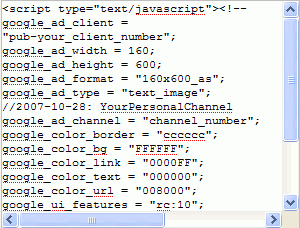 This is against Google’s policy. Just use the code as-is. Dont
play around with it at all.
4. Dont ever put pictures next to your Adsense Ads.
This is a relatively new policy. When i started with Adsense, this rule did not exist. Moreover, what Google actually wanted with this policy was never very clear. Nor did Google do a
good job of clearly defining what is allowed and what is not.
Even i had put some pretty images next to my Ads, and achieved excellent CTR. But here is a rule of thumb. If you are in doubt, ALWAYS play safe. When this policy was enforced, i did not waste a moment removing images that were next to my my Ads. After
all, I love my Adsense account, too!
My suggestion : If you have images next to your adsense ads,
remove them immediately
5. Dont ever title your Ads the wrong way.
You are not allowed to label your Ads with messages like “Click Here”, “Related Links” or anything else that misleads people into thinking that it is not an Advertisment.
You are however allowed to mention “Advertisements” or “Sponsored Links”, because your ads are actually Advertisments. And Google is OK with that. If you want, you may prefer not to put
any label at all.
6. Dont ever put Adsense on pages that do not have enough content.
Yeah, this is something that web-masters may not be aware of. But Google allows Adsense only on pages with good content.
Therefore it is not advisable to put ads on Thank You pages, subscription pages etc. Make doubly sure that you have Ads only on pages with good content.
This also means that you should not put your ads on sites with junk content. Any site that doesnt really add value to the visitor is considered to be a junk site
7. Dont ever put Adsense on sites that have got prohibitive content.
Make sure you do not have Ads on sites that have got anything to do with drugs, pornography,
hatred, gambling etc.
Again, this is self explantory, but some people simply don’t understand!
8. Dont ever create multiple Google Adsense Accounts.
Google allows you to have only 1 personal account and 1 business account. Google links these two accounts. Never try to fool Google by creating different accounts under different
names.
As long as you do not get caught, its fine. But if Google traces these accounts as being used by the same person, all your accounts are in danger of being suspended.
9. Dont ever enlist your site in any kind of
auto-surf or traffic exchange programs.
Again, this is against Google’s TOS. So stay clear of it.
10. Dont ever exceed the amount of ads you can display on a page.
Currently Google only allows 3 Ad blocks, 3 Link units and 2 referral buttons to be put on one page.I personally feel Google has allowed more than what is required. So, i dont know
why would you ever want more than this!
11. Dont ever reveal your Adsense Data
Google doesnt allow public display of your CTR, Impressions, eCPM etc on forums, eBooks, websites or any other publicly viewable media.
But Google doesnt have any objection if you mention how much you earn from Adsense.
12. Dont ever stay outdated!
Google’s policies are constantly changing. It will help if you know what changes are taking place in the world of Adsense so that you can update your sites if required.
If you get banned by Adsense for whatever reason you cannot give the excuse that you were “not aware” of the policy. This will not be of much help. So know the waters that you tread on!
This article, by no means, is a comprehensive list of Adsense Policies. I highly recommend you go through all the policies in details. And never even try to cheat the system.
Keep Clean for Google Adsense 12 Tips
article
Terms And Conditions and subsequently get banned.
If you are really serious about earning from Adsense, make sure you do not do anything that can get yourself banned. I have listed 12 things that you should NEVER even think of doing.
1. Dont ever click on your own Ads:
I think this is one of the biggest reasons why Adsense accounts get disabled. This seems obvious, but its surprising how many people actually do that intentionally.
If you think by clicking on your own ads, you can fool Google, you are highly mistaken. Google has got its own proprietory technology to find out if the publisher has clicked on his own
ads. And once they know that, your account is in jeopardy. Google wants to protect the investment of its advertisers, and it will never tolerate any false clicks. So make sure you do
not make this foolish mistake.
2. Dont ever tell others to click on your own Ads
I often see click-swapping on Adsense forums. Its kind of If you want a strong Adsense business, stay away from trouble. Dont ask even your friends, relatives or employees to click on
your ads. Do not provide any kind of an incentive to anyone for clicking on your ads.
I feel one good way to protect yourself is not to disclose your website’s domain to anyone. Keep it to yourself and you are safe!
3. Dont ever modify Google’s AdSense code
This is against Google’s policy. Just use the code as-is. Dontplay around with it at all.
4. Dont ever put pictures next to your Adsense Ads.
This is a relatively new policy. When i started with Adsense, this rule did not exist. Moreover, what Google actually wanted with this policy was never very clear. Nor did Google do a
good job of clearly defining what is allowed and what is not.
Even i had put some pretty images next to my Ads, and achieved excellent CTR. But here is a rule of thumb. If you are in doubt, ALWAYS play safe. When this policy was enforced, i did not waste a moment removing images that were next to my my Ads. After
all, I love my Adsense account, too!
My suggestion : If you have images next to your adsense ads,
remove them immediately
5. Dont ever title your Ads the wrong way.
You are not allowed to label your Ads with messages like “Click Here”, “Related Links” or anything else that misleads people into thinking that it is not an Advertisment.
You are however allowed to mention “Advertisements” or “Sponsored Links”, because your ads are actually Advertisments. And Google is OK with that. If you want, you may prefer not to put
any label at all.
6. Dont ever put Adsense on pages that do not have enough content.
Yeah, this is something that web-masters may not be aware of. But Google allows Adsense only on pages with good content.
Therefore it is not advisable to put ads on Thank You pages, subscription pages etc. Make doubly sure that you have Ads only on pages with good content.
This also means that you should not put your ads on sites with junk content. Any site that doesnt really add value to the visitor is considered to be a junk site
7. Dont ever put Adsense on sites that have got prohibitive content.
Make sure you do not have Ads on sites that have got anything to do with drugs, pornography,
hatred, gambling etc.
Again, this is self explantory, but some people simply don’t understand!
8. Dont ever create multiple Google Adsense Accounts.
Google allows you to have only 1 personal account and 1 business account. Google links these two accounts. Never try to fool Google by creating different accounts under different
names.
As long as you do not get caught, its fine. But if Google traces these accounts as being used by the same person, all your accounts are in danger of being suspended.
9. Dont ever enlist your site in any kind of
auto-surf or traffic exchange programs.
Again, this is against Google’s TOS. So stay clear of it.
10. Dont ever exceed the amount of ads you can display on a page.
Currently Google only allows 3 Ad blocks, 3 Link units and 2 referral buttons to be put on one page.I personally feel Google has allowed more than what is required. So, i dont know
why would you ever want more than this!
11. Dont ever reveal your Adsense Data
Google doesnt allow public display of your CTR, Impressions, eCPM etc on forums, eBooks, websites or any other publicly viewable media.
But Google doesnt have any objection if you mention how much you earn from Adsense.
12. Dont ever stay outdated!
Google’s policies are constantly changing. It will help if you know what changes are taking place in the world of Adsense so that you can update your sites if required.
If you get banned by Adsense for whatever reason you cannot give the excuse that you were “not aware” of the policy. This will not be of much help. So know the waters that you tread on!
This article, by no means, is a comprehensive list of Adsense Policies. I highly recommend you go through all the policies in details. And never even try to cheat the system.
Imagine the next time you join a discussion about Adsense. When you start sharing the fascinating Adsense facts below, your friends will be absolutely amazed.
Is everything making sense so far? If not, I’m sure that with just a little more reading, all the facts will fall into place.
Many web site owners are getting their Google Adsense account terminated when they have done nothing wrong to deserve the punishment. Considering the money that they are getting from Adsense, they would certainly want to get back into it.
Considering the money to be made with Adsense, it is no wonder that they would want to get back into it.
It is that same consideration why the Google Adsense click fraud is thought of and why many people are getting into it.
Click fraud is the act of clicking on ads for the purpose of costing the advertiser money. It is simply the same as paying out cash for false leads. Many people website owners are aware of this fraud and are sharing the same sentiment that this is the one big problem that Adsense is facing.
How do you prevent being involved in this fraud?
Majority of web hosts are offering access logs. Once this is offered to you, it is necessary that you hand it over to Google as well. This allows them to look for any suspicious activity on your site. Problems like this are very serious and giving it to them is saying that you would want to help them in any way you can in solving the problem.
It can also help if you have a click monitoring software. If you do not have one yet, you should try and get one. There is absolutely no major factor preventing you from having one because most of this software is free.
As usual, all the information you have received should be turned over to Google. This is showing Google that you too are fighting against click frauds and is in no way a part of it.
Study your server logs and watch for any activity that seems suspicious. Report anything that you may find odd, may it big or small thing.
You may want to consider disabling ads for your own IP address and local geographic area. This will certainly prevent accidents and will not make Google mistake another user as you. You can do through a htaccess file. This will avoid Google mistaking as clicking on your own ads and be kicked out because of it.
Keep your Adsense off on pop ups and pop unders. Your ads should not be displayed on content sites that promote illegal activity or tampering of the legal rights of other people or business. Included in this are the content that is considered adult and gambling ones. If you think that you may be breaking this rule, immediately remove your content or Adsense from the web page.
Be truthful and confess up to Google about times when you might have clicked on your own as, whether accidentally or intentionally. Or the times when you have done something that is against the Terms of Service that they are implementing. Be honest about anything that you may have done that is wrong. Confessing is way better than Google learning about it eventually. It would mean eventual termination and no getting back what you have worked so hard for.
Do not tell your family or friends about Adsense on your website. Chances are they may start clicking on them to help you make money without you knowing it. They may be doing more harm to you than help by trying it in the first place.
If ever someone you know chanced upon your Adsense, make sure they understand that they cannot click on your ads under any circumstances. It would be wise to brief them on important things about Adsense and what not to do with them.
Most pay per click networks have different measures in hand to protect website owners against click frauds. Other search engines can track more than 50 data points, IP address, browsers information, users session info and pattern recognition. They also have systems available that detects fraud. Not to mention the specialized teams monitoring how things are going and helping advertisers stop click frauds.
Google offers suggestion on how to avoid click fraud. Using negative keywords can be used to keep your Adsense showing on products and services that are in no way related to yours. Adding tracking URLs to your links so you can track the traffic coming from Google.
Do not be caught in the Google click fraud. Be aware and be wary.
Don’t limit yourself by refusing to learn the details about Adsense. The more you know, the easier it will be to focus on what’s important.

Google Adsense + Ads Click Fraud = BANNED
article
Is everything making sense so far? If not, I’m sure that with just a little more reading, all the facts will fall into place.
Many web site owners are getting their Google Adsense account terminated when they have done nothing wrong to deserve the punishment. Considering the money that they are getting from Adsense, they would certainly want to get back into it.
Considering the money to be made with Adsense, it is no wonder that they would want to get back into it.
It is that same consideration why the Google Adsense click fraud is thought of and why many people are getting into it.
Click fraud is the act of clicking on ads for the purpose of costing the advertiser money. It is simply the same as paying out cash for false leads. Many people website owners are aware of this fraud and are sharing the same sentiment that this is the one big problem that Adsense is facing.
How do you prevent being involved in this fraud?
Majority of web hosts are offering access logs. Once this is offered to you, it is necessary that you hand it over to Google as well. This allows them to look for any suspicious activity on your site. Problems like this are very serious and giving it to them is saying that you would want to help them in any way you can in solving the problem.
It can also help if you have a click monitoring software. If you do not have one yet, you should try and get one. There is absolutely no major factor preventing you from having one because most of this software is free.
As usual, all the information you have received should be turned over to Google. This is showing Google that you too are fighting against click frauds and is in no way a part of it.
Study your server logs and watch for any activity that seems suspicious. Report anything that you may find odd, may it big or small thing.
You may want to consider disabling ads for your own IP address and local geographic area. This will certainly prevent accidents and will not make Google mistake another user as you. You can do through a htaccess file. This will avoid Google mistaking as clicking on your own ads and be kicked out because of it.
Keep your Adsense off on pop ups and pop unders. Your ads should not be displayed on content sites that promote illegal activity or tampering of the legal rights of other people or business. Included in this are the content that is considered adult and gambling ones. If you think that you may be breaking this rule, immediately remove your content or Adsense from the web page.
Be truthful and confess up to Google about times when you might have clicked on your own as, whether accidentally or intentionally. Or the times when you have done something that is against the Terms of Service that they are implementing. Be honest about anything that you may have done that is wrong. Confessing is way better than Google learning about it eventually. It would mean eventual termination and no getting back what you have worked so hard for.
Do not tell your family or friends about Adsense on your website. Chances are they may start clicking on them to help you make money without you knowing it. They may be doing more harm to you than help by trying it in the first place.
If ever someone you know chanced upon your Adsense, make sure they understand that they cannot click on your ads under any circumstances. It would be wise to brief them on important things about Adsense and what not to do with them.
Most pay per click networks have different measures in hand to protect website owners against click frauds. Other search engines can track more than 50 data points, IP address, browsers information, users session info and pattern recognition. They also have systems available that detects fraud. Not to mention the specialized teams monitoring how things are going and helping advertisers stop click frauds.
Google offers suggestion on how to avoid click fraud. Using negative keywords can be used to keep your Adsense showing on products and services that are in no way related to yours. Adding tracking URLs to your links so you can track the traffic coming from Google.
Do not be caught in the Google click fraud. Be aware and be wary.
Don’t limit yourself by refusing to learn the details about Adsense. The more you know, the easier it will be to focus on what’s important.
Google adsense is a topic that many website owners know about but aren't sure how to make it work for them. The bottom line when it comes to earning money with google adsense is traffic and you should know that traffic can be a challenging thing if you don't know where to start.
To get the most from google adsense however, you will want to learn where to place your ads and formats that you should put them in. Having a high click through rate is important when it comes to your website so proper placement of your ads on your site is key.
If you have a blog, then one of the best places to host google adsense is on the top left corner of your blog. You want to put your ads here because this is where most people look first when visiting a website. You can sign up to Blogger.com and get your free blog and place adsense ads on there right now.
Another you will want to do is test whether or not graphic or text ads are working better on your website. Typically text ads will work best as it's much easier to have your ads blend in to your website. Graphic ads have their place on your website also, and a combination of the two can be used for the utmost effectiveness.
To get traffic to your adsense focused website, you should optimize your site for the search engines. You will want to do keyword research before creating your website and will want to optimize each of your pages around a particular keyword. This will allow the search engines to gain a good idea of what your website is about and will make it easier for them to rank your website accordingly.
To do keyword research for your site, you should take use of Google's free keyword suggestion tool. This keyword tool allows you to figure out which keywords buyers are searching for in addition to any hidden and obscure keywords. The hidden and obscure keywords are the keywords that you should be going for since they are low in competition and not too many people are optimizing their site around them.
When creating your adsense site, make sure that the theme of your website is unified. All of your pages should serve a purpose in relation to your site as a whole, and it will be best if you operate in a niche. Operating in a niche gives you the greatest chance of success, all while allowing you to operate against minimum competition.
You will also want to test out the different adsense formats that are available to you. The most popular adsense formats are the 300x250 medium rectangle, the 336x280 large rectangle, and the 160x600 skyscraper. These ad units are known to get the most clicks so be sure to start using them today to increase your income.
Take these adsense tips and start using them today. Good luck with earning money with google adsense.
Different Google Adsense Formats will Getting Traffic To Your Site
article
Google adsense is a topic that many website owners know about but aren't sure how to make it work for them. The bottom line when it comes to earning money with google adsense is traffic and you should know that traffic can be a challenging thing if you don't know where to start.
To get the most from google adsense however, you will want to learn where to place your ads and formats that you should put them in. Having a high click through rate is important when it comes to your website so proper placement of your ads on your site is key.
If you have a blog, then one of the best places to host google adsense is on the top left corner of your blog. You want to put your ads here because this is where most people look first when visiting a website. You can sign up to Blogger.com and get your free blog and place adsense ads on there right now.
Another you will want to do is test whether or not graphic or text ads are working better on your website. Typically text ads will work best as it's much easier to have your ads blend in to your website. Graphic ads have their place on your website also, and a combination of the two can be used for the utmost effectiveness.
To get traffic to your adsense focused website, you should optimize your site for the search engines. You will want to do keyword research before creating your website and will want to optimize each of your pages around a particular keyword. This will allow the search engines to gain a good idea of what your website is about and will make it easier for them to rank your website accordingly.
To do keyword research for your site, you should take use of Google's free keyword suggestion tool. This keyword tool allows you to figure out which keywords buyers are searching for in addition to any hidden and obscure keywords. The hidden and obscure keywords are the keywords that you should be going for since they are low in competition and not too many people are optimizing their site around them.
When creating your adsense site, make sure that the theme of your website is unified. All of your pages should serve a purpose in relation to your site as a whole, and it will be best if you operate in a niche. Operating in a niche gives you the greatest chance of success, all while allowing you to operate against minimum competition.
You will also want to test out the different adsense formats that are available to you. The most popular adsense formats are the 300x250 medium rectangle, the 336x280 large rectangle, and the 160x600 skyscraper. These ad units are known to get the most clicks so be sure to start using them today to increase your income.
Take these adsense tips and start using them today. Good luck with earning money with google adsense.
To get the most from google adsense however, you will want to learn where to place your ads and formats that you should put them in. Having a high click through rate is important when it comes to your website so proper placement of your ads on your site is key.
If you have a blog, then one of the best places to host google adsense is on the top left corner of your blog. You want to put your ads here because this is where most people look first when visiting a website. You can sign up to Blogger.com and get your free blog and place adsense ads on there right now.
Another you will want to do is test whether or not graphic or text ads are working better on your website. Typically text ads will work best as it's much easier to have your ads blend in to your website. Graphic ads have their place on your website also, and a combination of the two can be used for the utmost effectiveness.
To get traffic to your adsense focused website, you should optimize your site for the search engines. You will want to do keyword research before creating your website and will want to optimize each of your pages around a particular keyword. This will allow the search engines to gain a good idea of what your website is about and will make it easier for them to rank your website accordingly.
To do keyword research for your site, you should take use of Google's free keyword suggestion tool. This keyword tool allows you to figure out which keywords buyers are searching for in addition to any hidden and obscure keywords. The hidden and obscure keywords are the keywords that you should be going for since they are low in competition and not too many people are optimizing their site around them.
When creating your adsense site, make sure that the theme of your website is unified. All of your pages should serve a purpose in relation to your site as a whole, and it will be best if you operate in a niche. Operating in a niche gives you the greatest chance of success, all while allowing you to operate against minimum competition.
You will also want to test out the different adsense formats that are available to you. The most popular adsense formats are the 300x250 medium rectangle, the 336x280 large rectangle, and the 160x600 skyscraper. These ad units are known to get the most clicks so be sure to start using them today to increase your income.
Take these adsense tips and start using them today. Good luck with earning money with google adsense.
Why should I sign up for lifetime hosting? I might get hit by a bus tomorrow!
Oh wow, good point. If you got hit by a bus tomorrow, just after signing up for lifetime hosting, that would be a bummer. But then, ask yourself this: if you signed up for Lifetime Host (just $99 after all), got hit by a bus, and were flattened in the middle of the road, would you even care about the $99? We’re thinking probably not. Between watching your life flash before your eyes, rising above your body and meeting whatever maker you subscribe to, you’re going to be plenty busy with other stuff. Pretty sure.
Plus, think about this: what if you don’t get hit by a bus tomorrow? Let’s think positive and assume you’ll be alive tomorrow and for many, many days after. Do you want to spend those days paying for web hosting? Heck no! Do you want to spend them doing anything BUT paying for web hosting? Heck yes!
NOTE:If you do get hit by a bus tomorrow and pass into the next world, and your next world is some sort of evil purgatory, and the focus of your evil ghost obsession is the irony of opening a Lifetime Host account the day before you got hit by a bus and you decide to haunt our offices for eternity – you may call us for a full refund.
For way less than the cost of one year of web hosting with just about anyone else, you get a lifetime of hosting with Lifetime Host. That’s why we named it Lifetime Host. Good to keep things simple. With Lifetime Host, you don’t have to worry about your hosting being suspended or terminated because of an overlooked renewal email or expired credit card. (So lame.) You get the piece of mind of knowing that your site will always be hosted with us. Forever.
You’re probably thinking, hey, what’s the catch? How are you going to make money in like five years? Or ten years? I’m going to live a long time, dude. What’s the deal with Lifetime Host?
Here’s the deal. Lifetime Host is the brainchild of industry veteran Doktor Gurson (real name, not kidding). He also founded @Com Technology, which has been in business for 10 years, was the thirty-first ICANN Accredited Registrars in the world, and has registered over 50,000 domain names. After crunching the numbers, Doktor discovered that, based on the cost of server space and what-have-you, donuts for the guards and such, Lifetime Host actually makes sense. Perfect sense. Like, really good sense.
NOTE: Let’s talk about the guards and their donuts for a second, ok? Our servers are located in a 42,000 square foot facility in Fremont, CA. The facility offers a state-of-the-art home for our lifetime hosting customers. Features include gigabit Ethernet connections to other Bay Area facilities, raised flooring for excellent air flow, a UPS and emergency generator for power protection, N+1 redundancy, and more. The facility is fully staffed and is monitored with donut-eating guards 24/7.
Join Here.Click Here, click this picture to Buy or to Register
Here is the control panel for tester.
Today, cPanel is the most widely used control panel. Click here for a live demo of cPanel and its features.
Hosting For Lifetime just pay Once $99 max 10GB
article
Why should I sign up for lifetime hosting? I might get hit by a bus tomorrow!
Oh wow, good point. If you got hit by a bus tomorrow, just after signing up for lifetime hosting, that would be a bummer. But then, ask yourself this: if you signed up for Lifetime Host (just $99 after all), got hit by a bus, and were flattened in the middle of the road, would you even care about the $99? We’re thinking probably not. Between watching your life flash before your eyes, rising above your body and meeting whatever maker you subscribe to, you’re going to be plenty busy with other stuff. Pretty sure.Plus, think about this: what if you don’t get hit by a bus tomorrow? Let’s think positive and assume you’ll be alive tomorrow and for many, many days after. Do you want to spend those days paying for web hosting? Heck no! Do you want to spend them doing anything BUT paying for web hosting? Heck yes!
NOTE:If you do get hit by a bus tomorrow and pass into the next world, and your next world is some sort of evil purgatory, and the focus of your evil ghost obsession is the irony of opening a Lifetime Host account the day before you got hit by a bus and you decide to haunt our offices for eternity – you may call us for a full refund.
For way less than the cost of one year of web hosting with just about anyone else, you get a lifetime of hosting with Lifetime Host. That’s why we named it Lifetime Host. Good to keep things simple. With Lifetime Host, you don’t have to worry about your hosting being suspended or terminated because of an overlooked renewal email or expired credit card. (So lame.) You get the piece of mind of knowing that your site will always be hosted with us. Forever.
You’re probably thinking, hey, what’s the catch? How are you going to make money in like five years? Or ten years? I’m going to live a long time, dude. What’s the deal with Lifetime Host?
Here’s the deal. Lifetime Host is the brainchild of industry veteran Doktor Gurson (real name, not kidding). He also founded @Com Technology, which has been in business for 10 years, was the thirty-first ICANN Accredited Registrars in the world, and has registered over 50,000 domain names. After crunching the numbers, Doktor discovered that, based on the cost of server space and what-have-you, donuts for the guards and such, Lifetime Host actually makes sense. Perfect sense. Like, really good sense.
NOTE: Let’s talk about the guards and their donuts for a second, ok? Our servers are located in a 42,000 square foot facility in Fremont, CA. The facility offers a state-of-the-art home for our lifetime hosting customers. Features include gigabit Ethernet connections to other Bay Area facilities, raised flooring for excellent air flow, a UPS and emergency generator for power protection, N+1 redundancy, and more. The facility is fully staffed and is monitored with donut-eating guards 24/7.
Join Here.
Click Here, click this picture to Buy or to Register
Here is the control panel for tester.
Today, cPanel is the most widely used control panel. Click here for a live demo of cPanel and its features.
Whenever I mention my blog people roll their eyes or smile in an “I don’t understand but okay” sort of way. When I mention the fact that I make money blogging, however, I suddenly have their attention.
The concept seems simple enough. I write about topics that I enjoy, people read it, and I make money off the advertising. To those of us who’ve been doing it for a while, it is simple. To the novice blogger who’s just getting into the business, however, it’s important to realize what you’re getting into.
If you’re new to blogging and interested in doing it for profit, here are a few things to keep in mind before committing yourself.
- Blogging is easy. Blogging for profit is more difficult. I won’t go as far as to say it’s hard to draw a secondary income from blogging, but it’s definitely harder than most people think. It’s not just about producing content and slapping up some ads. Good writing, proper templating, ad placement, developing an audience… there are a lot of skills required to make a blog profitable, all of which you’ll need to learn.
- Blog for the long haul or not at all. A huge majority of blogs fail in the first few months, falling into neglect and disuse. More to the point, few blogs see any profit during the first few months. Unless you can stick with it for at least a year, you’ll probably never see any return for your effort.
- Pick a niche that you love and stick with it. General purpose or multi-topic blogs have difficulty developing a readership. Brainstorm the topics that you care about most, then pick one and blog about it exclusively.
- Start with one blog. If you have a lot of items on your list of possible topics, don’t give in to the temptation to start a different blog for each one. By dividing your effort between several blogs, you increase the likelihood that all of them will fail. Put all of your effort into one blog to start. Once you get the hang of things, then you might consider branching out with additional blogs.
- If you’re unsure, test drive. The fact is that many people don’t have the drive or stamina to blog for profit successfully. If you’re not sure, try a starter blog on a free service such as Blogger or WordPress.com. Feel it out for a few weeks. If, by the end of this time, you’ve stuck with it and feel like blogging is right for you, go ahead and commit to the effort. This advice applies equally well to test driving new topics if you’re unsure what to write about.
- Place ads wisely. Some people recommend not placing ads on a blog until it has matured somewhat. Others recommend putting them up right away. There are advantages and disadvantages to both approaches. Just be sure to place your ads tactfully so as not to overwhelm your readers. Put the user experience in the first place.
- Enjoy yourself. This is the real key to successful blogging. If you pick a topic that you love and blog about it with passion for months and years on end, your blog will build a readership, generate income, and generally be a success. If, however, your blog becomes a chore to maintain, it will inevitably fail.
The main point I want to convey is that many people try to blog for profit and fail. If you approach the task with the right expectations and some proper planning, you will succeed.
 7 Points to Consider Before Blogging for Money
article
7 Points to Consider Before Blogging for Money
article
The concept seems simple enough. I write about topics that I enjoy, people read it, and I make money off the advertising. To those of us who’ve been doing it for a while, it is simple. To the novice blogger who’s just getting into the business, however, it’s important to realize what you’re getting into.
If you’re new to blogging and interested in doing it for profit, here are a few things to keep in mind before committing yourself.
- Blogging is easy. Blogging for profit is more difficult. I won’t go as far as to say it’s hard to draw a secondary income from blogging, but it’s definitely harder than most people think. It’s not just about producing content and slapping up some ads. Good writing, proper templating, ad placement, developing an audience… there are a lot of skills required to make a blog profitable, all of which you’ll need to learn.
- Blog for the long haul or not at all. A huge majority of blogs fail in the first few months, falling into neglect and disuse. More to the point, few blogs see any profit during the first few months. Unless you can stick with it for at least a year, you’ll probably never see any return for your effort.
- Pick a niche that you love and stick with it. General purpose or multi-topic blogs have difficulty developing a readership. Brainstorm the topics that you care about most, then pick one and blog about it exclusively.
- Start with one blog. If you have a lot of items on your list of possible topics, don’t give in to the temptation to start a different blog for each one. By dividing your effort between several blogs, you increase the likelihood that all of them will fail. Put all of your effort into one blog to start. Once you get the hang of things, then you might consider branching out with additional blogs.
- If you’re unsure, test drive. The fact is that many people don’t have the drive or stamina to blog for profit successfully. If you’re not sure, try a starter blog on a free service such as Blogger or WordPress.com. Feel it out for a few weeks. If, by the end of this time, you’ve stuck with it and feel like blogging is right for you, go ahead and commit to the effort. This advice applies equally well to test driving new topics if you’re unsure what to write about.
- Place ads wisely. Some people recommend not placing ads on a blog until it has matured somewhat. Others recommend putting them up right away. There are advantages and disadvantages to both approaches. Just be sure to place your ads tactfully so as not to overwhelm your readers. Put the user experience in the first place.
- Enjoy yourself. This is the real key to successful blogging. If you pick a topic that you love and blog about it with passion for months and years on end, your blog will build a readership, generate income, and generally be a success. If, however, your blog becomes a chore to maintain, it will inevitably fail.
Direct advertising sales is arguably the best method to monetize a website. Finding advertisers for your site and actually closing the deals, however, is not as straight forward. Over the past 6 months I had more than 10 high profile companies sponsoring Daily Blog Tips, and through out this article I will share what I have learned along the way.
The Pros
- More money: The first advantage of selling your own ads is the fact that you will cut the middlemen out, increasing your revenue potential. Suppose you sell text link ads on your sidebar through a certain company, and the text links sell for $50 monthly. Since you are using the company network to sell the ads, they will eat 50% of the price, and you will end up earning only $25 monthly for each text link. If someone is willing to pay $50 for a text link on your site, though, it means that they are getting $50 of value out of it. Why, then, should you share that with someone else?
- Independence: Sure, large advertising networks have access to a wider pool of advertisers, and they have more credibility to close the deals. But if you have all the requirements in place (see the section below) and spend some time looking at the right places, I am sure that you will be able to sell your own ads just as efficiently as the larger networks.
- Flexibility: The third advantage of selling direct advertising is that you will have much more control over where and how the ads will be displayed (i.e., you can avoid intrusive advertising). Google Adsense is nice, but unless you blend it with the content – annoying some of the readers – you will get terribly low click-through rates.
- Credibility: Finally, having sponsors and direct advertisers on your blog might help your credibility. Even small and poorly crafted blogs can stick some Adsense units here and there. Having established companies that are willing to partnership with your site, on other hand, can signal that your content has quality and that the site is somewhat professional.
The Cons
- Time consuming: While selling your own ads has many advantages, it is no panacea. The first drawback of this monetization option is the time that it will consume. This time will be spent optimizing your website for the ads, finding potential advertisers, negotiating with them, and handling the administrative matters (e.g., making payments, tracking statistics, delivering reports and so on).
- Many requirements: Selling direct adverting is not as easy as making money from Google Adsense. As you can see from the section below, you will need to have a popular blog, a professional looking design, special software and the like.
- Unstable: Unless you close deals for very long periods, which is unlikely, you will find your self looking for new advertisers or optimizing your website to attract new ones every other month. The opposite is true for most advertising networks, where you just need to plug some code and they will do the rest of the work. (If your site or blog is just a hobby, therefore, direct advertising might not be the best option)
What You Need to Have in Place
- A popular website: Before landing direct advertising deals you will need to have a good amount of traffic on your site. There is no “magical” number here, but a good rule of thumb would be 1000 daily unique visitors. If you are below that mark you should focus on building traffic instead of looking for advertisers. Other factors like Google Pagerank, RSS subscribers and Alexa rank might also help. (Notice that small websites might also be able to sell direct advertising, but usually the time spent on that will not justify the results)
- A clear focus: You might have the most popular site on the Internet (well, not as extreme as that, but you get the point), but unless your site also has a very clear niche and a defined audience, advertisers will not find it very attractive. This means that you should avoid rambling about 100 different topics on the website. Advertisers want to deliver a message to specific people, and the more specific the better.
- A professional looking design: If you are planning to monetize your website through sponsors, you probably should invest some money into a professional looking design. Advertisers will be associating their product or service with your website, and not too many of them would be willing to get mixed with an ugly, MySpace looking site.
- Give visibility to the sponsors: This point is connected to the previous one. Not all templates and themes will be suitable for selling direct advertising. Preferably you want to have an idea of what kind of advertising you will sell (e.g., 468×60 banners, 125×125 banners, text links) and design your website according to those objectives. Advertisers want visibility, so reserve a good spot for them.
- Adserver software: In order to serve your ads, rotate banners and track statistics you will need to install an Adserver. If you are looking for a simple solution you should try WP-Ads. This WordPress plugin will serve ads for specific ad zones that you create. The only drawback is that it does not count clicks (only impressions). If you need a more sophisticated solution check OpenAds. You will need to spend some time learning how to use it, but it offers virtually all the features you will ever need.
- “Advertise Here” page: It is very important to have an “Advertise Here” page. On this page you want to give some details about the website, like audience, traffic and any other factor that might be of the interest of potential advertisers. Secondly, make sure that you have some link to that page on the navigation bar and if possible close to the zone where the ads will be displayed. You can see a perfect example of such layout on Copyblogger.com.
- Standard letter to approach advertisers: While some advertisers will contact you after reading your “Advertise Here” page, the rest of them will need to be directly approached by you. In that case, it is a good idea to create a standard letter to contact the advertisers. There is no “one size fits all” solution here, but you can follow some general guidelines: 1. Introduce yourself and quickly explain what the email is about
2. Explain why you decided to contact them and what they have to gain
3. Give details about your site (traffic, subscribers, topic, audience)
4. Give details about the advertising options (location on the site, max number of advertisers, monthly price)
That is it, after that information the advertisers should be able to decide if they are interested or not. If they reply, then you will fix the details. Bear in mind that all the info I mentioned should be contained in 2 or 3 paragraphs. If you send an essay to potential advertisers they will just skip it altogether.
- Accepting payments: You might have everything in place, but if you are not able to cash payments – or more importantly, if advertisers are not able to pay easily – you will end up losing deals. PayPal is the best option here. Notice, however, that a personal account will not suffice. You will need at least a premier account to be able to accept credit cards.
Where to Find the Advertisers
Once you have your direct advertising program established, you will start to receive inquiries from people. On the beginning, however, you will need to hunt advertisers down. Do not get discouraged if get turned down initially, provided you have all the aforementioned requirements, sooner or later you will find someone willing to take a shot on your site.
- People linking to your site or articles: If a company is willing to link to your articles or to add your website under its “Links” or “Resources” section, it is also probably willing to discuss about advertising on your site. Keep track of those incoming links.
- People leaving comments/e-mails: The same principle applies to people leaving comments on your blog or sending you e-mails. If among them you see an employee or the owner of a company that could be interested on your website, bingo! Contact him or her and get the conversation going.
- AdWords advertisers: Through out your search for advertisers you will notice that most of the established companies are not aware of the benefits of online advertising. If a certain company is already spending money on Google AdWords, however, it is very likely that it would also be open to other forms of online advertising. Think about some keywords that are related to your topic and Google them. Check the sponsored links that will appear and contact them. (You can also check the advertisers that appear on the Adsense units of related websites)
- Other advertising networks: While Google AdWords is by far the largest advertising network on the Internet, there are many others that could be useful. Check the companies that are spending money on AdBrite, Text-Link-Ads, BlogAds, SponsoredReviews and so on.
- Banner advertisers on similar sites: Check out popular websites on your niche and see what companies are advertising there. Provided you offer them an interesting deal (i.e., a reasonable price for your size), I am pretty sure they will be interested.
- Create a “Potential Sponsors” bookmark folder: This technique produced outstanding results for me. I have a bookmark folder on my browser called “Potential Sponsors.” Every time I come across a company or website that could be interested in sponsoring my website, I bookmark it. Currently I have over 100 bookmarked sites on that folder, and I have not approached half of them yet.
How Much to Charge
- You need to provide value: It is all about value. A potential sponsor or advertiser will want to see some returns for the money he will be spending on your site, and this can be seen as visibility (impressions) and leads (clicks and possible sales). Make sure, therefore, that your advertising deals will deliver.
- The numbers: Remember that there are some pretty cheap advertising options out there (e.g., Google AdWords), and you will need to be competitive. Provided you reserved a good spot for the sponsors (sidebar or header, preferably) you could start charging a $0,5 CPM (cost per 1000 impressions). If your blog is generating 100,000 monthly page views, therefore, a banner spot on your sidebar should cost around $50. Start low and build your way upwards. Popular blogs (e.g., TechCrunch) have a higher CPM, sometimes as high as $10, but you will need a huge credibility to arrive there.
- Cross-check: You can easily check if you are charging a suitable rate by using Adsense units on the places where you will sell direct advertising. Analyze how much you would gain with Adsense, and adjust your rates accordingly. Secondly, you can also check similar sites that are already selling direct ads.
- Be flexible regarding the terms: Flexibility is key. First of all make advertising agreements on a month-to-month basis. People don’t like to commit to something they are not completely sure about. If someone proposes you a longer deal, offer a discount in exchange.
- Offer test periods: Unless you have a very popular website, you will find potential advertisers reluctant to spend real money. If you are confident that the deal will create value for both parties, however, you can use that on your favor. Offer a free test period whenever needed. Some of the times the advertiser will turn you down after it, but other times they will confirm the deal. Either way you have nothing to lose.
How to Find Advertisers for Your Website: The Ultimate Guide
article
The Pros
- More money: The first advantage of selling your own ads is the fact that you will cut the middlemen out, increasing your revenue potential. Suppose you sell text link ads on your sidebar through a certain company, and the text links sell for $50 monthly. Since you are using the company network to sell the ads, they will eat 50% of the price, and you will end up earning only $25 monthly for each text link. If someone is willing to pay $50 for a text link on your site, though, it means that they are getting $50 of value out of it. Why, then, should you share that with someone else?
- Independence: Sure, large advertising networks have access to a wider pool of advertisers, and they have more credibility to close the deals. But if you have all the requirements in place (see the section below) and spend some time looking at the right places, I am sure that you will be able to sell your own ads just as efficiently as the larger networks.
- Flexibility: The third advantage of selling direct advertising is that you will have much more control over where and how the ads will be displayed (i.e., you can avoid intrusive advertising). Google Adsense is nice, but unless you blend it with the content – annoying some of the readers – you will get terribly low click-through rates.
- Credibility: Finally, having sponsors and direct advertisers on your blog might help your credibility. Even small and poorly crafted blogs can stick some Adsense units here and there. Having established companies that are willing to partnership with your site, on other hand, can signal that your content has quality and that the site is somewhat professional.
The Cons
- Time consuming: While selling your own ads has many advantages, it is no panacea. The first drawback of this monetization option is the time that it will consume. This time will be spent optimizing your website for the ads, finding potential advertisers, negotiating with them, and handling the administrative matters (e.g., making payments, tracking statistics, delivering reports and so on).
- Many requirements: Selling direct adverting is not as easy as making money from Google Adsense. As you can see from the section below, you will need to have a popular blog, a professional looking design, special software and the like.
- Unstable: Unless you close deals for very long periods, which is unlikely, you will find your self looking for new advertisers or optimizing your website to attract new ones every other month. The opposite is true for most advertising networks, where you just need to plug some code and they will do the rest of the work. (If your site or blog is just a hobby, therefore, direct advertising might not be the best option)
What You Need to Have in Place
- A popular website: Before landing direct advertising deals you will need to have a good amount of traffic on your site. There is no “magical” number here, but a good rule of thumb would be 1000 daily unique visitors. If you are below that mark you should focus on building traffic instead of looking for advertisers. Other factors like Google Pagerank, RSS subscribers and Alexa rank might also help. (Notice that small websites might also be able to sell direct advertising, but usually the time spent on that will not justify the results)
- A clear focus: You might have the most popular site on the Internet (well, not as extreme as that, but you get the point), but unless your site also has a very clear niche and a defined audience, advertisers will not find it very attractive. This means that you should avoid rambling about 100 different topics on the website. Advertisers want to deliver a message to specific people, and the more specific the better.
- A professional looking design: If you are planning to monetize your website through sponsors, you probably should invest some money into a professional looking design. Advertisers will be associating their product or service with your website, and not too many of them would be willing to get mixed with an ugly, MySpace looking site.
- Give visibility to the sponsors: This point is connected to the previous one. Not all templates and themes will be suitable for selling direct advertising. Preferably you want to have an idea of what kind of advertising you will sell (e.g., 468×60 banners, 125×125 banners, text links) and design your website according to those objectives. Advertisers want visibility, so reserve a good spot for them.
- Adserver software: In order to serve your ads, rotate banners and track statistics you will need to install an Adserver. If you are looking for a simple solution you should try WP-Ads. This WordPress plugin will serve ads for specific ad zones that you create. The only drawback is that it does not count clicks (only impressions). If you need a more sophisticated solution check OpenAds. You will need to spend some time learning how to use it, but it offers virtually all the features you will ever need.
- “Advertise Here” page: It is very important to have an “Advertise Here” page. On this page you want to give some details about the website, like audience, traffic and any other factor that might be of the interest of potential advertisers. Secondly, make sure that you have some link to that page on the navigation bar and if possible close to the zone where the ads will be displayed. You can see a perfect example of such layout on Copyblogger.com.
- Standard letter to approach advertisers: While some advertisers will contact you after reading your “Advertise Here” page, the rest of them will need to be directly approached by you. In that case, it is a good idea to create a standard letter to contact the advertisers. There is no “one size fits all” solution here, but you can follow some general guidelines: 1. Introduce yourself and quickly explain what the email is about
2. Explain why you decided to contact them and what they have to gain
3. Give details about your site (traffic, subscribers, topic, audience)
4. Give details about the advertising options (location on the site, max number of advertisers, monthly price)
That is it, after that information the advertisers should be able to decide if they are interested or not. If they reply, then you will fix the details. Bear in mind that all the info I mentioned should be contained in 2 or 3 paragraphs. If you send an essay to potential advertisers they will just skip it altogether. - Accepting payments: You might have everything in place, but if you are not able to cash payments – or more importantly, if advertisers are not able to pay easily – you will end up losing deals. PayPal is the best option here. Notice, however, that a personal account will not suffice. You will need at least a premier account to be able to accept credit cards.
Where to Find the Advertisers
Once you have your direct advertising program established, you will start to receive inquiries from people. On the beginning, however, you will need to hunt advertisers down. Do not get discouraged if get turned down initially, provided you have all the aforementioned requirements, sooner or later you will find someone willing to take a shot on your site.- People linking to your site or articles: If a company is willing to link to your articles or to add your website under its “Links” or “Resources” section, it is also probably willing to discuss about advertising on your site. Keep track of those incoming links.
- People leaving comments/e-mails: The same principle applies to people leaving comments on your blog or sending you e-mails. If among them you see an employee or the owner of a company that could be interested on your website, bingo! Contact him or her and get the conversation going.
- AdWords advertisers: Through out your search for advertisers you will notice that most of the established companies are not aware of the benefits of online advertising. If a certain company is already spending money on Google AdWords, however, it is very likely that it would also be open to other forms of online advertising. Think about some keywords that are related to your topic and Google them. Check the sponsored links that will appear and contact them. (You can also check the advertisers that appear on the Adsense units of related websites)
- Other advertising networks: While Google AdWords is by far the largest advertising network on the Internet, there are many others that could be useful. Check the companies that are spending money on AdBrite, Text-Link-Ads, BlogAds, SponsoredReviews and so on.
- Banner advertisers on similar sites: Check out popular websites on your niche and see what companies are advertising there. Provided you offer them an interesting deal (i.e., a reasonable price for your size), I am pretty sure they will be interested.
- Create a “Potential Sponsors” bookmark folder: This technique produced outstanding results for me. I have a bookmark folder on my browser called “Potential Sponsors.” Every time I come across a company or website that could be interested in sponsoring my website, I bookmark it. Currently I have over 100 bookmarked sites on that folder, and I have not approached half of them yet.
How Much to Charge
- You need to provide value: It is all about value. A potential sponsor or advertiser will want to see some returns for the money he will be spending on your site, and this can be seen as visibility (impressions) and leads (clicks and possible sales). Make sure, therefore, that your advertising deals will deliver.
- The numbers: Remember that there are some pretty cheap advertising options out there (e.g., Google AdWords), and you will need to be competitive. Provided you reserved a good spot for the sponsors (sidebar or header, preferably) you could start charging a $0,5 CPM (cost per 1000 impressions). If your blog is generating 100,000 monthly page views, therefore, a banner spot on your sidebar should cost around $50. Start low and build your way upwards. Popular blogs (e.g., TechCrunch) have a higher CPM, sometimes as high as $10, but you will need a huge credibility to arrive there.
- Cross-check: You can easily check if you are charging a suitable rate by using Adsense units on the places where you will sell direct advertising. Analyze how much you would gain with Adsense, and adjust your rates accordingly. Secondly, you can also check similar sites that are already selling direct ads.
- Be flexible regarding the terms: Flexibility is key. First of all make advertising agreements on a month-to-month basis. People don’t like to commit to something they are not completely sure about. If someone proposes you a longer deal, offer a discount in exchange.
- Offer test periods: Unless you have a very popular website, you will find potential advertisers reluctant to spend real money. If you are confident that the deal will create value for both parties, however, you can use that on your favor. Offer a free test period whenever needed. Some of the times the advertiser will turn you down after it, but other times they will confirm the deal. Either way you have nothing to lose.
Starting a new blog or growing an existing one can certainly be frustrating, as it may seem like you are not on pace to achieve your goals. Like anything worthwhile, building a solid and effective blog will take some time and hard work. As Daniel wrote recently, it gets easier with time if you can stick with it.
I see many bloggers completely give up or seriously slow down their activity because they feel like they are not getting anywhere, when in my opinion they are on the right track.
 Hopefully if you are doing the right things and making progress you will recognize your growth and accomplishments, but not all do. Here are 10 signs that your blog is on the right track. If several of these items apply to you, don’t give up just because the achievements are not coming fast enough. I think if you give it some time and continue to work, you will reach your goals in time.
1. Growing Subscriber Count
If your blog’s subscriber base is growing, even slowly, you are making some progress. Gaining trust and subscribers is not easy, so try not to get your expectations unrealistically high. If you have realistic goals for subscriber growth you will more likely be able to feel good about your progress and stay consistent with your blogging.
2. Increasing Numbers of Inbound Links
Links are important for any blog. They help with click-through traffic, search engine rankings, and recognition. For bloggers, incoming links are also representative of how well you are known in your industry and your number of links will grow as you start to become recognized as an authority.
3. Increasing Numbers of Valuable Comments
If your blog is receiving a decent amount of thought-provoking comments, that is a good sign that people are reading and paying attention to you. Comments are the lifeblood of blogs, and those that have a lot of valuable comments from readers become even more useful for readers.
4. Increasing Visitors, Pageviews, and/or Pagviews Per Visit
Many bloggers are stats junkies. While growth in traffic isn’t always representative of meeting or surpassing your blogging goals, it certainly isn’t a bad thing. Hopefully, over time your blog stats will increase as more and more readers visit and subscribe to your blog.
5. Consistent Posting
If you are posting consistently on your blog, you’re already one step ahead of the vast majority of bloggers. It sounds pretty easy, but consistent posting is a huge challenge for many. If you’re able to keep posting consistently, good things are likely to happen.
6. Improving Quality of Articles
Quality is always going to be a somewhat subjective issue, but I think most bloggers can look back through their archives and get a pretty accurate idea of how the quality has trended over time. I know that when I look back at my first few months of blog posts I’m kind of embarrassed at the low level of quality, and I don’t think I’m alone. Growth in quality is natural as you will become more knowledgeable about your topics and as you learn about blogging and writing in general. Take a look back at how your quality of writing has improved and I think you will be encouraged to keep going and see what happens.
7. An Ability to Clearly Define Your Niche
One of the most overlooked items when starting a new blog is being able to accurately define the audience that you will be targeting. As time goes by, you’ll learn what types of content your readers appreciate (and what they don’t respond to) and you’ll most likely get a better idea of where you fit into your niche. Knowing your place is very important for branding and creating a blog that is appealing to the readers that you are targeting. If you know precisely where you fit into your niche, you’re on the right track.
8. An Increasing Network of Bloggers
Networking is probably the most crucial aspect of blogging outside of content creation, and in some cases it can be even more important. If you are continually meeting new bloggers and strengthening the relationships that you have made, you will drastically be in a better position for the future. Building a network will help you to learn from others, gain valuable and loyal readers, increase inbound links, increase votes at social media sites, and much more.
9. A Knowledge of at Least 1 Specific Way to Get Targeted Readers to Your Blog
As you continue to blog, you will learn more about traffic generation and getting people to read and recognize what you have written. If you have even one specific method that consistently helps you to reach your target audience, you are better off than most bloggers. Maybe you have spent some time writing guest posts for other blogs in your niche, maybe you’ve had success with leaving intelligent and relevant comments at other blogs, or maybe you’ve developed a strong profile at a niche-specific social media website. Whatever the source is, if it is something that you can continue to use in the future, you are one step closer to blogging success.
10. Achievement of Goals
Many bloggers have long-term goals, such as making a living with a blog, or getting 10,000 subscribers. But what many bloggers lack are short-term goals that will help them to take the necessary steps towards those long-term goals. If you are setting monthly goals for blogging revenue, subscribers, traffic, etc. and you are achieving those goals, don’t give up because you are not getting to the long-term goals fast enough. Take pleasure in meeting your short-term goals and keep challenging yourself
10 Signs That Your Blog Is On The Right Track
article
I see many bloggers completely give up or seriously slow down their activity because they feel like they are not getting anywhere, when in my opinion they are on the right track.
1. Growing Subscriber Count
If your blog’s subscriber base is growing, even slowly, you are making some progress. Gaining trust and subscribers is not easy, so try not to get your expectations unrealistically high. If you have realistic goals for subscriber growth you will more likely be able to feel good about your progress and stay consistent with your blogging.
2. Increasing Numbers of Inbound Links
Links are important for any blog. They help with click-through traffic, search engine rankings, and recognition. For bloggers, incoming links are also representative of how well you are known in your industry and your number of links will grow as you start to become recognized as an authority.
3. Increasing Numbers of Valuable Comments
If your blog is receiving a decent amount of thought-provoking comments, that is a good sign that people are reading and paying attention to you. Comments are the lifeblood of blogs, and those that have a lot of valuable comments from readers become even more useful for readers.
4. Increasing Visitors, Pageviews, and/or Pagviews Per Visit
Many bloggers are stats junkies. While growth in traffic isn’t always representative of meeting or surpassing your blogging goals, it certainly isn’t a bad thing. Hopefully, over time your blog stats will increase as more and more readers visit and subscribe to your blog.
5. Consistent Posting
If you are posting consistently on your blog, you’re already one step ahead of the vast majority of bloggers. It sounds pretty easy, but consistent posting is a huge challenge for many. If you’re able to keep posting consistently, good things are likely to happen.
6. Improving Quality of Articles
Quality is always going to be a somewhat subjective issue, but I think most bloggers can look back through their archives and get a pretty accurate idea of how the quality has trended over time. I know that when I look back at my first few months of blog posts I’m kind of embarrassed at the low level of quality, and I don’t think I’m alone. Growth in quality is natural as you will become more knowledgeable about your topics and as you learn about blogging and writing in general. Take a look back at how your quality of writing has improved and I think you will be encouraged to keep going and see what happens.
7. An Ability to Clearly Define Your Niche
One of the most overlooked items when starting a new blog is being able to accurately define the audience that you will be targeting. As time goes by, you’ll learn what types of content your readers appreciate (and what they don’t respond to) and you’ll most likely get a better idea of where you fit into your niche. Knowing your place is very important for branding and creating a blog that is appealing to the readers that you are targeting. If you know precisely where you fit into your niche, you’re on the right track.
8. An Increasing Network of Bloggers
Networking is probably the most crucial aspect of blogging outside of content creation, and in some cases it can be even more important. If you are continually meeting new bloggers and strengthening the relationships that you have made, you will drastically be in a better position for the future. Building a network will help you to learn from others, gain valuable and loyal readers, increase inbound links, increase votes at social media sites, and much more.
9. A Knowledge of at Least 1 Specific Way to Get Targeted Readers to Your Blog
As you continue to blog, you will learn more about traffic generation and getting people to read and recognize what you have written. If you have even one specific method that consistently helps you to reach your target audience, you are better off than most bloggers. Maybe you have spent some time writing guest posts for other blogs in your niche, maybe you’ve had success with leaving intelligent and relevant comments at other blogs, or maybe you’ve developed a strong profile at a niche-specific social media website. Whatever the source is, if it is something that you can continue to use in the future, you are one step closer to blogging success.
10. Achievement of Goals
Many bloggers have long-term goals, such as making a living with a blog, or getting 10,000 subscribers. But what many bloggers lack are short-term goals that will help them to take the necessary steps towards those long-term goals. If you are setting monthly goals for blogging revenue, subscribers, traffic, etc. and you are achieving those goals, don’t give up because you are not getting to the long-term goals fast enough. Take pleasure in meeting your short-term goals and keep challenging yourself
Building a loyal RSS readership is the most difficult part of blogging. Driving traffic, hitting the Digg front page and building links can all be fluked by being in the right place at the right time; but impressing somebody enough for them to want to read your blog every day is far harder.
 Most of the worlds 50 or 100 million blogs will go through life with just a handful of readers before the writer decides to call it a day. Have you ever wondered how some blogs seem to attract new readers like a moth to a flame? Do you look at sites with thousands of readers and wonder how they do it?
Blog posts and tutorials designed to help you increase your readership focus on basic elements such as positioning your feed link above the fold etc. I’ve included these points in a basic checklist at the end but will be focusing on the more advanced methods of readership building in this article.
Citations from other bloggers
The first thing I did when starting BlogStorm was to sit down in front of my Netvibes RSS reader and look through all 200 feeds to try and figure out how I found them and why I subscribed to them. The results were very revealing and I found that most of the feeds added in the past 12 months were added after a personal recommendation from another trusted blogger. Only about 3 of the feeds were discovered after spotting the site on Digg or a similar social network.
Making use of this statistic is simple – you need to make sure lots of trusted bloggers with large readerships recommend your new blog. Of course this is easier said than done.
My method was to make sure the blog had something different to offer my readers and to use this as a marketing strategy. The internet marketing blogosphere is so saturated that for a new blog to start from nowhere offering unique advice was refreshing and a lot of people were happy to link to it.
I also spent a lot of time emailing all of my Gmail address book contacts to individually introduce the blog to them and make sure they knew all about it. Don’t beg for links, just make sure they know about your blog and who you are.
Gaining citations is a hard process and involves interacting with bloggers one at a time over periods of weeks, months or years. Sometimes you won’t ever get a link from them but if you know a blogger and have communicated by email they are much more likely to recommend you to their readers at some time in the future.
Pillar articles
The first five articles on a new blog are without doubt the most important. You need to establish a theme for your blog so that people know what type of posts to expect and prove to people that not only are you a great writer but that they really should subscribe to your blog.
Get these first few articles right and you can gain a few hundred readers in the first week.
Linkbait
Linkbaiting is a great strategy but it needs to be done in the right way. There is little point in hitting the Digg front page with a “Top 10″ article as thats not going to earn you any citations from popular blogs, unless you are just wanting to drive traffic. The key aspect of linkbaiting is to craft your linkbait in a way that is likely to gain you links from authority blogs and news websites. Hitting the Digg front page will send you a nice traffic boost and probably give you link from hundreds of sites that scrape the Digg feed, but unless your content is linkable you won’t see a boost in readership from it.
For me the main benefit of linkbaiting is to gain citations from other bloggers but its also a good strategy for driving what I call brute force traffic.
Traffic Bait
At the start of my promotion I wanted to raise awareness of my blog so I set about trying to drive as much traffic as I could in the hope some of it would stick. I call this brute force traffic and it’s a fun but not very effective strategy.
300,000 visitors later the fact that most of it doesn’t stick is only too apparent. Visitors from Digg and other social networks don’t subscribe to your feeds for the simple reason they visit maybe 50 new sites every day and can’t possibly subscribe to them all.
The main benefit of traffic bait is to drive natural citations and build brand awareness. If somebody doesn’t subscribe the first time they come across your site maybe they will the next time.
Your content
Regular readers don’t normally like to read loads of linkbait posts all the time. It’s very important you publish a mixture of very high quality posts and linkbait posts to keep your regular readers happy.
Give people a reason to read
People subscribe to blogs for a whole variety of reasons. Before you can attract a new reader you need to be able to understand why they might want to read what you have to say. If you write about the latest gadgets you need to break the news before Gizmodo and offer better reviews than Engadget if you want to be noticed. Internet marketing bloggers need to produce tips and articles that will help their readers make more money online.
Persuade your visitors their lives would be better if they subscribed to your blog.
Checklist: 7 easy ways to increase your readership
- Use a large RSS button in a prominent area on your page
- Offer email subscriptions
- Email people who forget to confirm their subscriptions
- Hold contests only for RSS readers
- Add a note to the bottom of every post pointing out your RSS feed
- Show off your stats with FeedBurner
- Include a link to explain what RSS is for your non internet savvy readers
How to Attract More RSS Subscribers – For Real
article
Blog posts and tutorials designed to help you increase your readership focus on basic elements such as positioning your feed link above the fold etc. I’ve included these points in a basic checklist at the end but will be focusing on the more advanced methods of readership building in this article.
Citations from other bloggers
The first thing I did when starting BlogStorm was to sit down in front of my Netvibes RSS reader and look through all 200 feeds to try and figure out how I found them and why I subscribed to them. The results were very revealing and I found that most of the feeds added in the past 12 months were added after a personal recommendation from another trusted blogger. Only about 3 of the feeds were discovered after spotting the site on Digg or a similar social network.Making use of this statistic is simple – you need to make sure lots of trusted bloggers with large readerships recommend your new blog. Of course this is easier said than done.
My method was to make sure the blog had something different to offer my readers and to use this as a marketing strategy. The internet marketing blogosphere is so saturated that for a new blog to start from nowhere offering unique advice was refreshing and a lot of people were happy to link to it.
I also spent a lot of time emailing all of my Gmail address book contacts to individually introduce the blog to them and make sure they knew all about it. Don’t beg for links, just make sure they know about your blog and who you are.
Gaining citations is a hard process and involves interacting with bloggers one at a time over periods of weeks, months or years. Sometimes you won’t ever get a link from them but if you know a blogger and have communicated by email they are much more likely to recommend you to their readers at some time in the future.
Pillar articles
The first five articles on a new blog are without doubt the most important. You need to establish a theme for your blog so that people know what type of posts to expect and prove to people that not only are you a great writer but that they really should subscribe to your blog.Get these first few articles right and you can gain a few hundred readers in the first week.
Linkbait
Linkbaiting is a great strategy but it needs to be done in the right way. There is little point in hitting the Digg front page with a “Top 10″ article as thats not going to earn you any citations from popular blogs, unless you are just wanting to drive traffic. The key aspect of linkbaiting is to craft your linkbait in a way that is likely to gain you links from authority blogs and news websites. Hitting the Digg front page will send you a nice traffic boost and probably give you link from hundreds of sites that scrape the Digg feed, but unless your content is linkable you won’t see a boost in readership from it.For me the main benefit of linkbaiting is to gain citations from other bloggers but its also a good strategy for driving what I call brute force traffic.
Traffic Bait
At the start of my promotion I wanted to raise awareness of my blog so I set about trying to drive as much traffic as I could in the hope some of it would stick. I call this brute force traffic and it’s a fun but not very effective strategy.300,000 visitors later the fact that most of it doesn’t stick is only too apparent. Visitors from Digg and other social networks don’t subscribe to your feeds for the simple reason they visit maybe 50 new sites every day and can’t possibly subscribe to them all.
The main benefit of traffic bait is to drive natural citations and build brand awareness. If somebody doesn’t subscribe the first time they come across your site maybe they will the next time.
Your content
Regular readers don’t normally like to read loads of linkbait posts all the time. It’s very important you publish a mixture of very high quality posts and linkbait posts to keep your regular readers happy.Give people a reason to read
People subscribe to blogs for a whole variety of reasons. Before you can attract a new reader you need to be able to understand why they might want to read what you have to say. If you write about the latest gadgets you need to break the news before Gizmodo and offer better reviews than Engadget if you want to be noticed. Internet marketing bloggers need to produce tips and articles that will help their readers make more money online.Persuade your visitors their lives would be better if they subscribed to your blog.
Checklist: 7 easy ways to increase your readership
- Use a large RSS button in a prominent area on your page
- Offer email subscriptions
- Email people who forget to confirm their subscriptions
- Hold contests only for RSS readers
- Add a note to the bottom of every post pointing out your RSS feed
- Show off your stats with FeedBurner
- Include a link to explain what RSS is for your non internet savvy readers
When I re-opened the Online Profits training program back in June, there were two main changes. First of all the course became virtually free. That is, you just need to create a hosting account with my hosting partner to gain a lifetime member account to the program now.
The second change was the introduction of a new section in the members area, called “Live Case Study.” Inside that section members would basically follow the steps I would take to build, promote and monetize a website from scratch. I created this section because I wanted the members to gain some practical knowledge too, learning how to apply all the concepts they would get from the training material.
I decided to build a mini website for the case study (also called niche website), because you don’t need to spend too much time or money building one, and once the site is “complete” it becomes a passive stream of income.
This doesn’t mean that making money with mini websites is fast though. I launched my mini website on July, and I was expecting to start generating some revenues with it after three or four months. But this little project surprised me. In the very first month it generated $875 in profits, and I only used free methods to promote it. I am not sure how things will evolve, but if things keep going as they are by the end of the year the mini website will be making close to $2,000 per month.
If you want to follow the case study and check all the steps I am taking to build and promote the mini website, with screenshots and monthly reports, you just need to join the Online Profits training program. I say “just” because it is a no-brainer right now. You’ll pay $5 or so to sign-up for a hosting account with our partner (HostNine), and you’ll get complete access to our training material, the live case study, the resources section, the content library and more. Plus, you get another hosting account, and you can use that to build your own mini website. You can check all the details and join here.
How I Made $900 With A Mini Website, In The First Month
article
The second change was the introduction of a new section in the members area, called “Live Case Study.” Inside that section members would basically follow the steps I would take to build, promote and monetize a website from scratch. I created this section because I wanted the members to gain some practical knowledge too, learning how to apply all the concepts they would get from the training material.
I decided to build a mini website for the case study (also called niche website), because you don’t need to spend too much time or money building one, and once the site is “complete” it becomes a passive stream of income.
This doesn’t mean that making money with mini websites is fast though. I launched my mini website on July, and I was expecting to start generating some revenues with it after three or four months. But this little project surprised me. In the very first month it generated $875 in profits, and I only used free methods to promote it. I am not sure how things will evolve, but if things keep going as they are by the end of the year the mini website will be making close to $2,000 per month.
If you want to follow the case study and check all the steps I am taking to build and promote the mini website, with screenshots and monthly reports, you just need to join the Online Profits training program. I say “just” because it is a no-brainer right now. You’ll pay $5 or so to sign-up for a hosting account with our partner (HostNine), and you’ll get complete access to our training material, the live case study, the resources section, the content library and more. Plus, you get another hosting account, and you can use that to build your own mini website. You can check all the details and join here.
I want to know how many blog posts in percentage normally Google indexes from a blog. I have been running a blog for a year, and I noticed only 30% of my posts are indexed by Google. What steps should I take to improve that?
Provided that you respect some basic SEO guidelines, 100% of your posts should be indexed by Google. The basic SEO guidelines are:
1. All your posts must have unique and quality content. By unique I mean that the content of your posts should be found only on a single place (i.e., avoid duplicate content both inside and outside your domain). By quality I mean that the content should be useful to potential visitors. If you repeat the letter “z” one thousand times you would end up with unique content, but it would have zero quality so Google would probably not index that.
2. All your posts must be accessible through static links on your site. You need to have a sound site structure in place, else the Google bot might not be able to find some of your internal pages and posts. If you use a modern CMS, like WordPress or Joomla, this shouldn’t be an issue.
3. Your domain must have some backlinks. As you probably know backlinks are the search engine currency. You need some of them if you want Google to discover your website in the first place. Secondly, if you want to have all your pages indexed and some good search rankings, you will need to have a decent amount of backlinks. Keep in mind that there is a PageRank threshold that your pages must pass before they get included in Google’s index.
It is normal for a new website to have only part of its internal pages indexed. Over time, however, this should be fixed. If you have been blogging for around one year and still only 30% of your posts are indexed by Google you might have a problem. I would start investigating duplicate content issues. Once you are sure you don’t have that, work on getting more backlinks.
How To Get Your Pages Indexed By Google
article
I want to know how many blog posts in percentage normally Google indexes from a blog. I have been running a blog for a year, and I noticed only 30% of my posts are indexed by Google. What steps should I take to improve that?Provided that you respect some basic SEO guidelines, 100% of your posts should be indexed by Google. The basic SEO guidelines are:
1. All your posts must have unique and quality content. By unique I mean that the content of your posts should be found only on a single place (i.e., avoid duplicate content both inside and outside your domain). By quality I mean that the content should be useful to potential visitors. If you repeat the letter “z” one thousand times you would end up with unique content, but it would have zero quality so Google would probably not index that.
2. All your posts must be accessible through static links on your site. You need to have a sound site structure in place, else the Google bot might not be able to find some of your internal pages and posts. If you use a modern CMS, like WordPress or Joomla, this shouldn’t be an issue.
3. Your domain must have some backlinks. As you probably know backlinks are the search engine currency. You need some of them if you want Google to discover your website in the first place. Secondly, if you want to have all your pages indexed and some good search rankings, you will need to have a decent amount of backlinks. Keep in mind that there is a PageRank threshold that your pages must pass before they get included in Google’s index.
It is normal for a new website to have only part of its internal pages indexed. Over time, however, this should be fixed. If you have been blogging for around one year and still only 30% of your posts are indexed by Google you might have a problem. I would start investigating duplicate content issues. Once you are sure you don’t have that, work on getting more backlinks.
I was wondering what your recommendation would be for a blogger who wants to try out the best alternatives to Google Adsense.
This is a popular question among bloggers and webmasters. Some of them will have a hard time getting accepted into Google’s AdSense program, while others will get banned for one reason or another. After that that remain looking for alternatives.
First of all keep in mind that Google AdSense is still the best CPC network on the web. Some people don’t like, some claim to make more money with other networks, but the vast majority of website owners agree that Google AdSense is the best CPC advertising option, period (this does not mean it is the best monetization strategy, as affiliate marketing or selling your own products could beat the earnings of AdSense easily).
Considering this fact, I would highly recommend you to play it safe with your AdSense account. If you are not sure about the program policies and guidelines, take some 30 minutes to read them and to make sure your sites respect all of them. Getting banned from AdSense is a bad thing for anyone working on the Internet, because the ban is for life.
With that out of the way, what are the alternatives to Google AdSense?
If you are looking for CPC alternatives, I would recommend two networks. The first one is Chitika. They used to run product based ads only, but recently they have expanded to a wide range of categories, in which they call “Premium Ads.”
The second alternative is BidVertiser. This network works like AdSense, but they have a smaller amount of advertisers, so the CPC rates you’ll get will be smaller.
Apart from using CPC ads, however, you could also try CPM based ones. This means you’ll get per 1,000 impressions rather than per click. Tribal Fusion is one of the best networks in this segment, but your site must receive over 500,000 unique visitors monthly to qualify. Networks that will accept smaller sites include Casale Media and AdBrite.
The third option would be to use affiliate marketing offers that will pay you when you either when you refer a paying customer (called CPS offers) or when you refer a lead that will perform a specific action like subscribing to an email newsletter (called CPA offers). Two very large affiliate networks you can try are ClickBank and Commission Junction.
Finally, you could also try to sell your advertising spots directly. This means you would manage the ads and interact with sponsors directly. I talk extensively about this method on the article How to Find Advertisers for Your Website: The Ultimate Guide.
What Are The Alternatives to Google AdSense?
article
I was wondering what your recommendation would be for a blogger who wants to try out the best alternatives to Google Adsense.This is a popular question among bloggers and webmasters. Some of them will have a hard time getting accepted into Google’s AdSense program, while others will get banned for one reason or another. After that that remain looking for alternatives.
First of all keep in mind that Google AdSense is still the best CPC network on the web. Some people don’t like, some claim to make more money with other networks, but the vast majority of website owners agree that Google AdSense is the best CPC advertising option, period (this does not mean it is the best monetization strategy, as affiliate marketing or selling your own products could beat the earnings of AdSense easily).
Considering this fact, I would highly recommend you to play it safe with your AdSense account. If you are not sure about the program policies and guidelines, take some 30 minutes to read them and to make sure your sites respect all of them. Getting banned from AdSense is a bad thing for anyone working on the Internet, because the ban is for life.
With that out of the way, what are the alternatives to Google AdSense?
If you are looking for CPC alternatives, I would recommend two networks. The first one is Chitika. They used to run product based ads only, but recently they have expanded to a wide range of categories, in which they call “Premium Ads.”
The second alternative is BidVertiser. This network works like AdSense, but they have a smaller amount of advertisers, so the CPC rates you’ll get will be smaller.
Apart from using CPC ads, however, you could also try CPM based ones. This means you’ll get per 1,000 impressions rather than per click. Tribal Fusion is one of the best networks in this segment, but your site must receive over 500,000 unique visitors monthly to qualify. Networks that will accept smaller sites include Casale Media and AdBrite.
The third option would be to use affiliate marketing offers that will pay you when you either when you refer a paying customer (called CPS offers) or when you refer a lead that will perform a specific action like subscribing to an email newsletter (called CPA offers). Two very large affiliate networks you can try are ClickBank and Commission Junction.
Finally, you could also try to sell your advertising spots directly. This means you would manage the ads and interact with sponsors directly. I talk extensively about this method on the article How to Find Advertisers for Your Website: The Ultimate Guide.
When I wrote “most bloggers” in the title, I was including myself. In fact I forget this rule 80% of the time probably. Want to know what rule I am taking about? It is this one:
Include one image on each blog post you publish.
This rule is important for a couple of reasons. First of all adding images to your blog posts will help you capture the attention of distracted readers and encourage them to read your post.
Second, having images around will improve the design of your blog and make it more appealing.
Third, images can be a good source of search engine traffic, especially every post you publish has one (i.e., over time the combined traffic you’ll get for your images will add up).
So why do most bloggers forget this simple rule? Probably because they get lazy over time. That is my case at least. The solution is to force yourself to add those images initially, until you develop the habit.
Check out this post if you don’t know where to find images for your blog. I mention one paid and two free sources there, so money is not an excuse.
Most Bloggers Forget This Simple Rule. Do You?
article
Include one image on each blog post you publish.
This rule is important for a couple of reasons. First of all adding images to your blog posts will help you capture the attention of distracted readers and encourage them to read your post.
Second, having images around will improve the design of your blog and make it more appealing.
Third, images can be a good source of search engine traffic, especially every post you publish has one (i.e., over time the combined traffic you’ll get for your images will add up).
So why do most bloggers forget this simple rule? Probably because they get lazy over time. That is my case at least. The solution is to force yourself to add those images initially, until you develop the habit.
Check out this post if you don’t know where to find images for your blog. I mention one paid and two free sources there, so money is not an excuse.
Traffic is the currency of the web. The more traffic your website has, the easier it will be to achieve your objective, be it to make money, to spread your ideas, to connect with other people or anything else.
That is why we decided to create a compilation with 100 ways you can use to increase your website traffic. Apply some (or most) of them and we are sure your numbers will go up!
Blogs
 1. Add a blog to your website. If your website is static (e.g., a corporate site or an online store), consider adding a blog to it, where you’ll write new content regularly. This will give your visitors a reason to come back, and your search engine traffic will increase too. If you need a blog software, check out WordPress (it is free and easy to use).
2. Leave comments on other blogs. Develop the habit of visiting blogs inside your niche and leaving comments on them. You can include a link to your website on each comment, and some visitors will certainly come through those links. You can use Alltop to find blogs in any niche.
3. Write guest posts. Most blogs accept guest posts. That is, they allow you to write a post for them, and usually the post carries an author byline with a link to your website. Simply send your article to the blog owner and ask whether or not he wants to publish it as a guest post.
4. Sponsor blog contests. Another common practice around the blogosphere are contests. You can sponsor one by donating products or money, and the blogger will link to your website from the contest page.
5. Join a blog carnival. Blog carnivals are online events where bloggers get together to write about one specific topic. The host of the carnival will them write a round-up post linking to all the participant entries, and participants usually link to each others’ entries as well. You can organize one with your friends, or browse for existing ones at BlogCarnival.com.
6. Network, network, network. Ever heard the saying “it is not about what you know, but who you know”? It applies to promoting a website as well. If you become a friend with a blogger or website owner, he will be much more likely to link to your website and send traffic your way. A good way to achieve this is to link to other bloggers first and to establish a relationship via email.
Subscribers
 7. Publish an RSS feed. Once you publish an RSS feed your visitors will be able to subscribe to your website using an RSS reader. After that whenever you publish new content they will receive it automatically, which is a great way to keep these visitors engaged with your content and visiting your website regularly.
8. Use Feedburner. If you want to get the most out of your RSS feed you should sign-up for a Feedburner account. It is completely free, and you’ll get a wide range of features, including statistics about your subscribers, customization options and so on. Feedburner will also make your RSS feed compatible with most browsers and RSS readers, so you won’t lose any subscribers due to technical problems.
9. Offer email subscriptions. Many Internet users still don’t use RSS, so offering an email subscription to your content is a must. Fortunately it is very easy to do this once you have a Feedburner account. You just need to activate this feature under “Publicize,” and then copy and paste the subscription link on your website.
10. Create an email newsletter. You can take your email subscription option one step further and create an email newsletter. This will give you more control regarding the messages you send to your subscribers. For example, you could create an auto-responder sequence, sending specific messages at specific time intervals to your new subscribers. You’ll need an email marketing software to manage your newsletter, and you can use Aweber for that (it is a paid solution).
Content is King
 11. Break a news story. If your website is the first to talk about a news story it will receive many links from other sites who will cover it as well, and your traffic will increase as a result.
12. Write a controversial article. If you manage to write something controversial, people will talk about and link to your article, either because they agree with you or, most likely, because they disagree. The result will be a lot of traffic.
13. Write a “Top 10″ list. Internet users love “Top 10″ lists, because they are easy to digest and contain useful stuff (i.e., 10 resources, 10 tips, and so on).
14. Write a “Top 100″ list. If “Top 10″ lists are good for traffic generation, “Top 100″ ones are great. This article is an example. People will bookmark and share your “Top 100″ list naturally because of the value it packs together.
15. Write a “Definitive guide” to something. People love to learn new things, especially if such things will solve some of their problems. Make sure to make your guide as complete as possible, and visitors will flock to read it.
16. Publish an interview. This strategy works even better if the interviewee has a blog or website, as he might link to the interview and send his readers to your site.
17. Leverage holidays and seasonal events. You can drastically increase your traffic if you publish content related to big holidays and seasonal events. Examples include Christmas, elections, Olympic games, the World Cup and so on.
Linkbaits
 19. Create a quiz. People love quizzes, and if you create an interesting one your traffic might increase as visitors both take the quiz and share the results with their friends. You can use ProProfs.com to create your quiz.
19. Create a ranking of people. For example, publish a ranking with the “50 Hottest Female Entrepreneurs.” Such rankings tend to get a lot of traffic because it plays with people’s ego.
20. Create a ranking of websites. A similar strategy is to create a ranking of websites, say the “25 Best Weight Loss Blogs.” The owners of the sites mentioned are likely to link to your article (especially if you contact them to let them know about it, thus sending your traffic.
21. Publish a funny image. At the end of the day, people just want to have a good laugh. Publishing a funny image is a good way to help them with that, and it might increase your traffic at the same time. Want some inspiration? Check the Pics section on Reddit.
22. Create an infographic. If you are creative and like to research, then you should try creating infographics, as they tend to attract many links and traffic. Here is a tutorial that will help you to create one.
Freebies
 23. Release an eBook. This is one of the most efficient ways to generate traffic. Simply write a compelling eBook, and then release it on your website. Include a direct download link, and email bloggers and webmasters in your niche to let them know about it. The better the information in your eBook, the more people will share and recommend it, and the more traffic you’ll gain.
24. Create a free CSS template. CSS templates are very popular around the web, and if you submit yours to CSS directories many people will end up using it. Include a footer link to your website and you’ll surely get some traffic.
25. Create a free WordPress theme. You can also transform your CSS template into a WordPress theme (or create a new theme from scratch). WordPress is used by millions of users, and many people will download your theme if you submit it to directories (including the Official Themes Directory).
26. Release a cheat sheet. Cheat sheets are very popular on the web, and if you create one you’ll certainly see a bump in the number of website visits. If you want to see some examples, check this article listing 25 useful cheat sheets for web developers.
27. Create web design resources. The web design community is one of the most active online, and creating resources for them is a good way to increase your traffic. Examples include icon sets, fonts, textures, Photoshop brushes and the like.
Contests
 28. Launch a retweet contest. You can launch a contest where people need to retweet the contest page in order to get an entry to the random draw. The prize can be either money or products and services from your sponsors. Depending on the size of your prize the retweets could go viral after a while.
29. Launch a comment contest. An alternative contest format is to ask people to leave a comment on your contest post in order to get an entry. This will increase your traffic because your RSS and email subscribers will need to visit your website to leave a comment, and it will stimulate them to comment on your posts more often.
30. Launch a review contest. If you want to increase your search rankings you could launch a contest where people need to write about the content in order to get an entry. The links you’ll get will send you both Google juice and new visitors. Keep in mind that you need a good prize to motivate people to write about your contest though.
31. Launch a voting contest. You basically need to create a contest where the winner will be picked with a voting session. Suppose you have a fitness website. You could invite your readers to submit their best fitness tip, and then a voting session would decide which tip gets the prize. This would motivate participants to link to the voting session and to encourage their friends to visit your website and vote.
32. Launch a traffic contest. If traffic is what you want, why not be direct about it? You can launch a contest where people need to send traffic to one particular page inside your website. It could be the contest page (for a viral effect) or a resource page (e.g., a page where you give away an ebook). After the established time frame (e.g., 2 weeks, 1 month or anything else), you’ll simply need to check your web analytics to see which websites sent you more visitors, and then award the prizes.
Multimedia
 33 Experiment with video. As you probably heard, video is huge on the web right now. If you are not experimenting with it yet, you should. If you want to do something simple, just record yourself talking in front of the web cam (obviously what you are talking about should be interesting to your visitors, as opposed to some general rambling).
34. Create screencasts. A very efficient way to create compelling videos is to record your computer screen while you perform some task. For instance, you could use it teach other people how to use the computer or how to do things on the Internet. You can use a free software called CamStudio to create your screencasts.
35. Submit your videos to multiple sites. Once you have your videos ready to go, you should spread them on as many video websites as possible, and not just on YouTube. Luckily there is a site that can help you do that without spending too much time at it. It is called TubeMogul.com, and it automates much of the submission process for you.
36. Launch a podcast. This could be a good traffic generator for one main reason: there isn’t much competition out there as far as podcasts go. In other words, as long as you put some effort into it, your podcast could become the leader inside your niche quite fast. All you need is a USB microphone to start recording.
37. Release audio interviews. We already mentioned that interviews are good for traffic. Apart from text interviews, however, you can also release audio interviews. Skype makes it really easy to record one. You’ll just need to use a software to record your Skype conversation. PowerGramo has a free version that works well.
Social Bookmarking Sites
 38. Get people to stumble your articles. If you have friends using Stumble Upon, ask them to stumble your best articles. This should get the ball rolling, and if other Stumble Upon users like your content it might receive a lot of traffic from it.
39. Try to reach Digg’s front page. Reaching Digg‘s front page is quite difficult, but it is worth a try, because once you manage it you’ll receive tens of thousands of visitors. You should start by becoming an active Digg user, trying to make as many friends as possible and to understand the kind of content that works there. Once you have these two things, get a friend to submit one of your best stories, and get your network of contacts to vote on it.
40. Submit your content to Reddit. If you fail to get success with Digg, try Reddit. It works in a similar way, but it is smaller and has a more friendly community, so your content might do better there. Funny stuff, technology and politics are topics particularly suitable for the site.
41. Get your visitors to bookmark your articles on Delicious. If you publish many how-to articles and tutorials, Delicious could be a good traffic generator for your website. Simply add a Delicious icon below your articles, try to get some friends to bookmark your articles as soon as they get published. If you get enough bookmarks in a short period of time your article might get promoted to Delicious front page.
42. Include social bookmarking icons on your site. You can increase the number of votes and bookmarks you’ll get by including social bookmarking icons on your site. You can use this generator to create the icons automatically and paste the code on your website.
43. Try niche social bookmarking sites. The four social bookmarking sites mentioned above are the largest ones on the web, but there is also a wide range of smaller, niche focused bookmarking sites that can send you some traffic. Here is a list with 83 of them. Simply join the ones related to your niche and check how much traffic they can send you.
Social Networks
 44. Create a profile on most social networks. When you create a profile on a social network, you are usually able to include the URL of your website. Guess what? This is a link building opportunity, and it might increase your traffic (both because of the visitors you’ll get and because of the link juice). Mashable has a list with over 350 social networks, so use that to get started.
45. Start using Facebook. If you want to generate social media traffic, you must have a presence on Facebook. The very least you should do is to create an account there and network with as many people as possible. After you’ll be able to generate traffic by posting links to your website on your Facebook stream.
46. Create a Facebook fan page. Another great way to leverage Facebook is to create a Fan page. This is basically a page dedicated to your website, where your visitors can become fans, leave comments and so on. Here is a tutorial to help you create your first Fan page.
47. Include a Facebook “Like” button on your site. Facebook recently introduced the “Like” button, which you can embed on your site to let your users share your content through their Facebook accounts. Getting the button is just a matter of copying and pasting some lines of code. Here is the page where you can get it.
48. Start using Twitter. Another must have social network is Twitter. You can create an account for yourself, or one for your website directly, where you’ll post updates with links to your recent posts and related content from around the web.
49. Include a Tweetmeme button on your site. By including a Tweetmeme button on your website you’ll allow your visitors to retweet your posts and pages with a single click, which can increase the traffic you’ll receive from Twitter.
50. Explore niche social networks. You problably won’t get as much traffic from niche social networks as you will from Facebook and Twitter. But you should still give them a shot, because the traffic will be much more targeted. Here is a list with 233 social networks divided by niche.
Website Optimization
 51. Customize your 404 error page. Whether you like it or not people will get 404 errors on your website. Maybe they will misspell your URLs, maybe someone will link to an inexistent page inside your website, and so on. If you use a normal 404 error page, visitors will simply move on to another website. If you customize your 404 error page to include some useful links, however, you’ll channel these visitors to other parts of your site, thus increasing your traffic.
52. Interlink your pages. This strategy will increase your traffic in two ways. First of all it will allow your visitors to explore your website more easily, increasing the number of pages views per visit. Secondly, it will also improve your search rankings because your link juice will be distributed among all pages of your website.
53. Highlight your most popular content. People like to know “what is hot” when they are visiting a website. You can increase the number of page views you’ll get per visitor if you highlight your popular content and encourage them to read it. The easiest way to achieve this is to create a “Popular Articles” section on your sidebar.
54. Test your website in different browsers. If web users can’t visualize your website properly they’ll just move on to another site. That is why you need to make sure that your site works fine on the most popular browsers. There is an online service called Browsershots.org that can help you with that, and it is completely free.
55. Speed up your website. There are many research papers confirming that most Internet users will only wait a couple of seconds for a web page to load. If it doesn’t, they will close it and move to another website. On top of that search engines also use the loading speed as a ranking factor, so the faster your site loads, the higher your search rankings. The first thing you should do to improve your loading speed is to remove unnecessary elements from your site and to reduce the size of your images. You can use the Firebug extension for Firefox to perform a more detailed analysis of your loading speed.
56. Serve cached pages. A very efficient way to improve the loading speed of your pages is to serve cached versions to your visitors. This will also reduce the load on your web server, and make your site more responsive. WordPress users can install a plugin called WP Super Cache to achieve this.
57. Get a decent hosting plan. No matter how much your optimize your website, however, it will still load slowly if your hosting plan is mediocre to begin with. That is why you should stay away from free and cheap web hosts. Investment $10 per month to get a quality hosting plan is a must.
Search Engine Optimization
 58. Create unique content. If you want to receive search engine traffic and only had time to work on one thing, you should work on creating unique content for your website. This is what Google and company values most. The more unique content you have, and the more frequently you publish new stuff, the better.
59. Build backlinks. The second most important thing you can do to improve your search rankings and receive organic traffic is to build backlinks. That is, you need to have as many websites linking to you as possible. The higher the quality and relevancy of these links, the better. If you have a tech blog, for example, getting a link from TechCrunch or some other authoritative tech site would do wonders to your SEO.
60. Perform keyword research. Search engines work around keywords, and if you understand the keywords that people use you can tailor your content to match that. For example, the term “funny pictures” is 15 times more searched than the term “funny images,” so you probably should use that in a post title . You can use the Google AdWords Keyword Tool to discover the search volume of any keyword.
61. Optimize your title tags. The title tag is the title of your pages. It goes inside the <title></title> tags in the header of your HTML code, and it is displayed on top of the browser when visiting your page. This is a very important on-page SEO factor. You should make sure that you have a unique title tag on each page of your site, and that your main keywords are present there. WordPress users can install the All in One SEO Pack plugin to achieve this automatically.
62. Build an HTML sitemap. An HTML sitemap is basically a page inside your website linking to all other pages (and preferably being linked from all other pages too). The HTML sitemap helps search engines to crawl and index your website, thus increasing your search rankings.
63 Use images. Most webmasters forget that Google has a feature called “Image search,” which is quite popular. This means that by using images inside your pages you can increase the amount of search engine traffic you get. Just make sure to optimize the name of your images with relevant keywords, and always include an ALT and a TITLE attribute in your image tags. You can use the sxc.hu website to find thousands of royalty free images to use on your website.
64. Translate your content. Depending on the topic of your website, translating your pages into other languages could multiply your search engine traffic. In order to achieve this you need a plugin that will get your translated pages indexed by search engines. WordPress users can use one called Global Translator.
Mobile
 65. Create a mobile version of your website. As more and more users start accessing the web through mobile devices, it becomes important to have a version of your website that works perfectly these new platforms. If you are using WordPress you can install a plugin called WPTouch to create a mobile version automatically.
66. Create an iPhone app for your website. iPhone is arguable the most popular smartphone around, and most of its users rely heavily on apps to consume their content. If you create an iPhone app to display the content of your website you could both get new readers and allow your current ones to read your stuff on their iPhones. There is an open source project that will help you do this for free.
67. Create an Android app for your website. Google’s mobile operating system, called Android, is quickly catching up, so you could create a website app for it as well. You’ll need some coding knowledge for this though.
Online Forums
 68. Join online forums and put a link to your website in your signature. Regardless of the topic of your website, you’ll certainly find dozens of related online forums to join. Most of them allow you to put a link in your signature, and you can use that to send visitors to your own website. If you need help to find online forums, check Big-Boards.com, as they have a database of thousands of forums divided by categories.
69. Link to your articles from post threads. Apart from putting a link to your website in your signature, you can also link to your articles when writing forum posts. For example, if you just wrote a post that is useful to other forum members, you could start a thread letting them know about it, and asking for feedback. Just make sure to do this when your article is relevant, else you might get flagged as a spammer.
70. Join the Craigslist forums. If you browse on Craigslist (the most popular classifieds site on the web) you’ll notice that inside each city there is a “Discussion forums” section. You can write posts there, and include links to your website whenever relevant to the discussion.
71. Consider adding a Forum to your site. Once your website reach a critical mass of users (i.e., 5,000 daily unique visitors or more) you could consider adding a Forum to it. This will give your visitors a place to ask questions and contribute content, while increasing your traffic. phpBB is a reliable and free Forum software you can use.
Content Hubs
 72. Create “lenses” on Squidoo. Each “lens” on Squidoo is an overview page about a specific topic. Creating lenses is free, and you can include any kind of information on them, including links to your own website.
73. Create a “hub” on HubPages. A very similar site is called HubPages. You can create “hubs” about specific topics, and include links to your website there. Just make sure to read the site guidelines, to make sure your hubs will be published.
74. Answer to questions on Yahoo! Answers. Spend some time browsing the questions on Yahoo! Answers, and whenever you come across one related to the topic of your site, answer it. You can include a link to your website as an additional resource, or to a specific article inside your site that answers the question too.
75. Answer to questions on LinkedIn. LinkedIn Answers is another platform where you can answer to questions from other users and include a link to your own website or articles. Keep in mind that topics gravitate around career and business here.
Old School
 76. Submit your site to web directories. The amount of traffic you’ll get from this tactic depends on the quality of the web directories that will accept you. If you submit to hundreds of them, however, the traffic might build up. Here is a list with hundreds of web directories, organized by Google PageRank.
77. Submit your blog to blog directories. If you have a blog, you can also submit to blog directories (i.e., web directories that only list blogs). This article lists 50 of them to get you started.
78. Submit content to article directories. Article marketing is a very common and effective way to increase your traffic. You basically need to submit your articles to article directories. Virtually all of them allow you to include a link back to your site, and that is how your traffic will increase. Here is a list with the 50 most popular article directories on the web.
79. Exchange links. The practice of exchanging links is as old as the web, but that is so because it works. You just need to be careful to only exchange links with sites that have unique content and are relevant to your visitors (else Google might get upset).
80. Use ad swaps. A similar strategy is to use ad swaps. That is, you use your unused ad space to promote the website of your partner, and he does the same with his unused ad space. The ad itself could be anything, from a banner spot to an email message to your newsletter.
81. Distribute a press release. Creating and distributing a press release can still send some traffic to your website, especially if you have something new in your segment. You can pay companies like PRWeb to do most of the work for you, or you can submit the press release manually (here is a list with 50 sites you can submit to).
82. Include your website’s URL in your email signature. Email is the most used communication channel these days, and as such you should use it to let your contacts know about your website.
Paid Methods
 83. Google AdWords. Pay-per-click advertising is one of the most efficient ways to buy traffic for your website, and Google AdWords is the largest ad network for that on the web. Creating an account is free, and then you’ll need to bid on keywords. Depending on your niche it is possible to buy clicks for as low as some pennies.
84. Facebook ads. The best alternative to Google AdWords is the Facebook Ads platform. You’ll be able to pay both per click and per 1,000 impressions, and you can also target very specific demographics, to make sure the visitors will be interested in your content.
85. StumbleUpon ads. If your content performs well on social media you could try StumbleUpon ads. Your website (or a specific page inside it) will basically be displayed to StumbleUpon users, with a cost of $0.05 per view. If many users vote positively on your content you’ll also receive some free traffic.
86. Reddit sponsored links. Another social bookmarking site where you can buy ads on is Reddit. You’ll basically create a sponsored link that will be featured on the homepage, and Reddit users will be able to vote it up or down.
87. Purchase banner ads directly. Virtually any website owner is willing to sell banner ads. If you find a website that is closely related to yours, therefore, you could contacts the owner asking how much he would charge for a banner ad. The return on the investment might be high here, because the visitors that will come will be likely to stick around and become loyal readers of your site.
88. Purchase banner ads through networks. There are ad networks that might also help you purchase banner ads, paying a flat monthly fee. BuySellAds.com is a large one with a really big inventory of websites.
89. Purchase sponsored reviews. Sometimes sponsored reviews work better for traffic generation, because your website will be featured inside a post (i.e., it will be exposed directly to the readers of the other site). If you want to buy a sponsored review you could either contact the website owner directly, or browse through the marketplace of sites like SponsoredReviews.com (make sure the sponsored links will have the nofollow attribute, else Google might get pissed).
Offline Methods
 90. Tell your friends and family about your website. These folks are certainly going to be interested in checking your website out, and if you put new content there frequently, they might keep coming back.
91. Tell your co-workers about your website. This is another group of people that will be interested in visiting your website at least one. If the content of your website is somewhat related to your work this strategy will work even better.
92. Include your website’s URL in your business card. If you give business cards away frequently, consider including your website’s URL there. Professional contacts might be interested in visiting it after all.
93. Print your website’s URL in some T-shirts. It is very easy and cheap to get custom T-shirts these days (just Google it), so getting some with your website’s URL could be a nice way to spread the word about it.
94. Create stickers with your website’s URL and spread them around. If you really want to go guerilla, get some stickers with your website’s URL and spread them around. Cars, windows, computers, you name it!
95. Put an ad at a local newspaper. Depending on the niche of your website, getting an ad on a local newspaper could be a good investment. For example, if you have a blog about local news or events an ad on the local newspaper could definitely bring you some new readers.
Out of the box Methods
 96. Come up with an April Fools’ prank. The first of April is a very lively day on the Internet, where many companies and webmasters come up with funny pranks. If you come up with a funny or interesting one other website owners might link to your, sending you traffic. You can check TechCrunch’s summary of the 2010 pranks for inspiration.
97. Set your website as the homepage on any computer you use. If you apply this tactic consistently it might actually bring good results. For instance, you could set your website as the homepage of all computers in your school, work, libraries and so on.
98. Navigate to your website on computer stores. This might not bring you a lot of traffic, but it sure is a funny tactic. Whenever you go to a store with computers being showcased, open the web browser and navigate to your website, so that people passing by will see it.
99. List your website for sale. Even if you are not planning to sell it, that is. The interested buyers will visit your website to check it out, and that is how you’ll increase your traffic. If you list your site on popular marketplaces, like Flippa.com, you might actually get thousand of visitors (and possible some good offers!).
100. Fake a hacker attack. The community of bloggers and webmasters gets in turmoil every time a website or blog gets hacked. If you fake such an attack (i.e., by putting a weird message in your homepage) you’ll certainly receive many backlinks and a bump in traffic. People might get pissed if they find out it was a prank, though
100 Ways to Increase Your Website Traffic
article
That is why we decided to create a compilation with 100 ways you can use to increase your website traffic. Apply some (or most) of them and we are sure your numbers will go up!
Blogs
1. Add a blog to your website. If your website is static (e.g., a corporate site or an online store), consider adding a blog to it, where you’ll write new content regularly. This will give your visitors a reason to come back, and your search engine traffic will increase too. If you need a blog software, check out WordPress (it is free and easy to use). 2. Leave comments on other blogs. Develop the habit of visiting blogs inside your niche and leaving comments on them. You can include a link to your website on each comment, and some visitors will certainly come through those links. You can use Alltop to find blogs in any niche.
3. Write guest posts. Most blogs accept guest posts. That is, they allow you to write a post for them, and usually the post carries an author byline with a link to your website. Simply send your article to the blog owner and ask whether or not he wants to publish it as a guest post.
4. Sponsor blog contests. Another common practice around the blogosphere are contests. You can sponsor one by donating products or money, and the blogger will link to your website from the contest page.
5. Join a blog carnival. Blog carnivals are online events where bloggers get together to write about one specific topic. The host of the carnival will them write a round-up post linking to all the participant entries, and participants usually link to each others’ entries as well. You can organize one with your friends, or browse for existing ones at BlogCarnival.com.
6. Network, network, network. Ever heard the saying “it is not about what you know, but who you know”? It applies to promoting a website as well. If you become a friend with a blogger or website owner, he will be much more likely to link to your website and send traffic your way. A good way to achieve this is to link to other bloggers first and to establish a relationship via email.
Subscribers
7. Publish an RSS feed. Once you publish an RSS feed your visitors will be able to subscribe to your website using an RSS reader. After that whenever you publish new content they will receive it automatically, which is a great way to keep these visitors engaged with your content and visiting your website regularly. 8. Use Feedburner. If you want to get the most out of your RSS feed you should sign-up for a Feedburner account. It is completely free, and you’ll get a wide range of features, including statistics about your subscribers, customization options and so on. Feedburner will also make your RSS feed compatible with most browsers and RSS readers, so you won’t lose any subscribers due to technical problems.
9. Offer email subscriptions. Many Internet users still don’t use RSS, so offering an email subscription to your content is a must. Fortunately it is very easy to do this once you have a Feedburner account. You just need to activate this feature under “Publicize,” and then copy and paste the subscription link on your website.
10. Create an email newsletter. You can take your email subscription option one step further and create an email newsletter. This will give you more control regarding the messages you send to your subscribers. For example, you could create an auto-responder sequence, sending specific messages at specific time intervals to your new subscribers. You’ll need an email marketing software to manage your newsletter, and you can use Aweber for that (it is a paid solution).
Content is King
11. Break a news story. If your website is the first to talk about a news story it will receive many links from other sites who will cover it as well, and your traffic will increase as a result. 12. Write a controversial article. If you manage to write something controversial, people will talk about and link to your article, either because they agree with you or, most likely, because they disagree. The result will be a lot of traffic.
13. Write a “Top 10″ list. Internet users love “Top 10″ lists, because they are easy to digest and contain useful stuff (i.e., 10 resources, 10 tips, and so on).
14. Write a “Top 100″ list. If “Top 10″ lists are good for traffic generation, “Top 100″ ones are great. This article is an example. People will bookmark and share your “Top 100″ list naturally because of the value it packs together.
15. Write a “Definitive guide” to something. People love to learn new things, especially if such things will solve some of their problems. Make sure to make your guide as complete as possible, and visitors will flock to read it.
16. Publish an interview. This strategy works even better if the interviewee has a blog or website, as he might link to the interview and send his readers to your site.
17. Leverage holidays and seasonal events. You can drastically increase your traffic if you publish content related to big holidays and seasonal events. Examples include Christmas, elections, Olympic games, the World Cup and so on.
Linkbaits
19. Create a quiz. People love quizzes, and if you create an interesting one your traffic might increase as visitors both take the quiz and share the results with their friends. You can use ProProfs.com to create your quiz.19. Create a ranking of people. For example, publish a ranking with the “50 Hottest Female Entrepreneurs.” Such rankings tend to get a lot of traffic because it plays with people’s ego.
20. Create a ranking of websites. A similar strategy is to create a ranking of websites, say the “25 Best Weight Loss Blogs.” The owners of the sites mentioned are likely to link to your article (especially if you contact them to let them know about it, thus sending your traffic.
21. Publish a funny image. At the end of the day, people just want to have a good laugh. Publishing a funny image is a good way to help them with that, and it might increase your traffic at the same time. Want some inspiration? Check the Pics section on Reddit.
22. Create an infographic. If you are creative and like to research, then you should try creating infographics, as they tend to attract many links and traffic. Here is a tutorial that will help you to create one.
Freebies
23. Release an eBook. This is one of the most efficient ways to generate traffic. Simply write a compelling eBook, and then release it on your website. Include a direct download link, and email bloggers and webmasters in your niche to let them know about it. The better the information in your eBook, the more people will share and recommend it, and the more traffic you’ll gain. 24. Create a free CSS template. CSS templates are very popular around the web, and if you submit yours to CSS directories many people will end up using it. Include a footer link to your website and you’ll surely get some traffic.
25. Create a free WordPress theme. You can also transform your CSS template into a WordPress theme (or create a new theme from scratch). WordPress is used by millions of users, and many people will download your theme if you submit it to directories (including the Official Themes Directory).
26. Release a cheat sheet. Cheat sheets are very popular on the web, and if you create one you’ll certainly see a bump in the number of website visits. If you want to see some examples, check this article listing 25 useful cheat sheets for web developers.
27. Create web design resources. The web design community is one of the most active online, and creating resources for them is a good way to increase your traffic. Examples include icon sets, fonts, textures, Photoshop brushes and the like.
Contests
28. Launch a retweet contest. You can launch a contest where people need to retweet the contest page in order to get an entry to the random draw. The prize can be either money or products and services from your sponsors. Depending on the size of your prize the retweets could go viral after a while. 29. Launch a comment contest. An alternative contest format is to ask people to leave a comment on your contest post in order to get an entry. This will increase your traffic because your RSS and email subscribers will need to visit your website to leave a comment, and it will stimulate them to comment on your posts more often.
30. Launch a review contest. If you want to increase your search rankings you could launch a contest where people need to write about the content in order to get an entry. The links you’ll get will send you both Google juice and new visitors. Keep in mind that you need a good prize to motivate people to write about your contest though.
31. Launch a voting contest. You basically need to create a contest where the winner will be picked with a voting session. Suppose you have a fitness website. You could invite your readers to submit their best fitness tip, and then a voting session would decide which tip gets the prize. This would motivate participants to link to the voting session and to encourage their friends to visit your website and vote.
32. Launch a traffic contest. If traffic is what you want, why not be direct about it? You can launch a contest where people need to send traffic to one particular page inside your website. It could be the contest page (for a viral effect) or a resource page (e.g., a page where you give away an ebook). After the established time frame (e.g., 2 weeks, 1 month or anything else), you’ll simply need to check your web analytics to see which websites sent you more visitors, and then award the prizes.
Multimedia
33 Experiment with video. As you probably heard, video is huge on the web right now. If you are not experimenting with it yet, you should. If you want to do something simple, just record yourself talking in front of the web cam (obviously what you are talking about should be interesting to your visitors, as opposed to some general rambling).34. Create screencasts. A very efficient way to create compelling videos is to record your computer screen while you perform some task. For instance, you could use it teach other people how to use the computer or how to do things on the Internet. You can use a free software called CamStudio to create your screencasts.
35. Submit your videos to multiple sites. Once you have your videos ready to go, you should spread them on as many video websites as possible, and not just on YouTube. Luckily there is a site that can help you do that without spending too much time at it. It is called TubeMogul.com, and it automates much of the submission process for you.
36. Launch a podcast. This could be a good traffic generator for one main reason: there isn’t much competition out there as far as podcasts go. In other words, as long as you put some effort into it, your podcast could become the leader inside your niche quite fast. All you need is a USB microphone to start recording.
37. Release audio interviews. We already mentioned that interviews are good for traffic. Apart from text interviews, however, you can also release audio interviews. Skype makes it really easy to record one. You’ll just need to use a software to record your Skype conversation. PowerGramo has a free version that works well.
Social Bookmarking Sites
38. Get people to stumble your articles. If you have friends using Stumble Upon, ask them to stumble your best articles. This should get the ball rolling, and if other Stumble Upon users like your content it might receive a lot of traffic from it. 39. Try to reach Digg’s front page. Reaching Digg‘s front page is quite difficult, but it is worth a try, because once you manage it you’ll receive tens of thousands of visitors. You should start by becoming an active Digg user, trying to make as many friends as possible and to understand the kind of content that works there. Once you have these two things, get a friend to submit one of your best stories, and get your network of contacts to vote on it.
40. Submit your content to Reddit. If you fail to get success with Digg, try Reddit. It works in a similar way, but it is smaller and has a more friendly community, so your content might do better there. Funny stuff, technology and politics are topics particularly suitable for the site.
41. Get your visitors to bookmark your articles on Delicious. If you publish many how-to articles and tutorials, Delicious could be a good traffic generator for your website. Simply add a Delicious icon below your articles, try to get some friends to bookmark your articles as soon as they get published. If you get enough bookmarks in a short period of time your article might get promoted to Delicious front page.
42. Include social bookmarking icons on your site. You can increase the number of votes and bookmarks you’ll get by including social bookmarking icons on your site. You can use this generator to create the icons automatically and paste the code on your website.
43. Try niche social bookmarking sites. The four social bookmarking sites mentioned above are the largest ones on the web, but there is also a wide range of smaller, niche focused bookmarking sites that can send you some traffic. Here is a list with 83 of them. Simply join the ones related to your niche and check how much traffic they can send you.
Social Networks
44. Create a profile on most social networks. When you create a profile on a social network, you are usually able to include the URL of your website. Guess what? This is a link building opportunity, and it might increase your traffic (both because of the visitors you’ll get and because of the link juice). Mashable has a list with over 350 social networks, so use that to get started. 45. Start using Facebook. If you want to generate social media traffic, you must have a presence on Facebook. The very least you should do is to create an account there and network with as many people as possible. After you’ll be able to generate traffic by posting links to your website on your Facebook stream.
46. Create a Facebook fan page. Another great way to leverage Facebook is to create a Fan page. This is basically a page dedicated to your website, where your visitors can become fans, leave comments and so on. Here is a tutorial to help you create your first Fan page.
47. Include a Facebook “Like” button on your site. Facebook recently introduced the “Like” button, which you can embed on your site to let your users share your content through their Facebook accounts. Getting the button is just a matter of copying and pasting some lines of code. Here is the page where you can get it.
48. Start using Twitter. Another must have social network is Twitter. You can create an account for yourself, or one for your website directly, where you’ll post updates with links to your recent posts and related content from around the web.
49. Include a Tweetmeme button on your site. By including a Tweetmeme button on your website you’ll allow your visitors to retweet your posts and pages with a single click, which can increase the traffic you’ll receive from Twitter.
50. Explore niche social networks. You problably won’t get as much traffic from niche social networks as you will from Facebook and Twitter. But you should still give them a shot, because the traffic will be much more targeted. Here is a list with 233 social networks divided by niche.
Website Optimization
51. Customize your 404 error page. Whether you like it or not people will get 404 errors on your website. Maybe they will misspell your URLs, maybe someone will link to an inexistent page inside your website, and so on. If you use a normal 404 error page, visitors will simply move on to another website. If you customize your 404 error page to include some useful links, however, you’ll channel these visitors to other parts of your site, thus increasing your traffic. 52. Interlink your pages. This strategy will increase your traffic in two ways. First of all it will allow your visitors to explore your website more easily, increasing the number of pages views per visit. Secondly, it will also improve your search rankings because your link juice will be distributed among all pages of your website.
53. Highlight your most popular content. People like to know “what is hot” when they are visiting a website. You can increase the number of page views you’ll get per visitor if you highlight your popular content and encourage them to read it. The easiest way to achieve this is to create a “Popular Articles” section on your sidebar.
54. Test your website in different browsers. If web users can’t visualize your website properly they’ll just move on to another site. That is why you need to make sure that your site works fine on the most popular browsers. There is an online service called Browsershots.org that can help you with that, and it is completely free.
55. Speed up your website. There are many research papers confirming that most Internet users will only wait a couple of seconds for a web page to load. If it doesn’t, they will close it and move to another website. On top of that search engines also use the loading speed as a ranking factor, so the faster your site loads, the higher your search rankings. The first thing you should do to improve your loading speed is to remove unnecessary elements from your site and to reduce the size of your images. You can use the Firebug extension for Firefox to perform a more detailed analysis of your loading speed.
56. Serve cached pages. A very efficient way to improve the loading speed of your pages is to serve cached versions to your visitors. This will also reduce the load on your web server, and make your site more responsive. WordPress users can install a plugin called WP Super Cache to achieve this.
57. Get a decent hosting plan. No matter how much your optimize your website, however, it will still load slowly if your hosting plan is mediocre to begin with. That is why you should stay away from free and cheap web hosts. Investment $10 per month to get a quality hosting plan is a must.
Search Engine Optimization
58. Create unique content. If you want to receive search engine traffic and only had time to work on one thing, you should work on creating unique content for your website. This is what Google and company values most. The more unique content you have, and the more frequently you publish new stuff, the better. 59. Build backlinks. The second most important thing you can do to improve your search rankings and receive organic traffic is to build backlinks. That is, you need to have as many websites linking to you as possible. The higher the quality and relevancy of these links, the better. If you have a tech blog, for example, getting a link from TechCrunch or some other authoritative tech site would do wonders to your SEO.
60. Perform keyword research. Search engines work around keywords, and if you understand the keywords that people use you can tailor your content to match that. For example, the term “funny pictures” is 15 times more searched than the term “funny images,” so you probably should use that in a post title . You can use the Google AdWords Keyword Tool to discover the search volume of any keyword.
61. Optimize your title tags. The title tag is the title of your pages. It goes inside the <title></title> tags in the header of your HTML code, and it is displayed on top of the browser when visiting your page. This is a very important on-page SEO factor. You should make sure that you have a unique title tag on each page of your site, and that your main keywords are present there. WordPress users can install the All in One SEO Pack plugin to achieve this automatically.
62. Build an HTML sitemap. An HTML sitemap is basically a page inside your website linking to all other pages (and preferably being linked from all other pages too). The HTML sitemap helps search engines to crawl and index your website, thus increasing your search rankings.
63 Use images. Most webmasters forget that Google has a feature called “Image search,” which is quite popular. This means that by using images inside your pages you can increase the amount of search engine traffic you get. Just make sure to optimize the name of your images with relevant keywords, and always include an ALT and a TITLE attribute in your image tags. You can use the sxc.hu website to find thousands of royalty free images to use on your website.
64. Translate your content. Depending on the topic of your website, translating your pages into other languages could multiply your search engine traffic. In order to achieve this you need a plugin that will get your translated pages indexed by search engines. WordPress users can use one called Global Translator.
Mobile
65. Create a mobile version of your website. As more and more users start accessing the web through mobile devices, it becomes important to have a version of your website that works perfectly these new platforms. If you are using WordPress you can install a plugin called WPTouch to create a mobile version automatically. 66. Create an iPhone app for your website. iPhone is arguable the most popular smartphone around, and most of its users rely heavily on apps to consume their content. If you create an iPhone app to display the content of your website you could both get new readers and allow your current ones to read your stuff on their iPhones. There is an open source project that will help you do this for free.
67. Create an Android app for your website. Google’s mobile operating system, called Android, is quickly catching up, so you could create a website app for it as well. You’ll need some coding knowledge for this though.
Online Forums
68. Join online forums and put a link to your website in your signature. Regardless of the topic of your website, you’ll certainly find dozens of related online forums to join. Most of them allow you to put a link in your signature, and you can use that to send visitors to your own website. If you need help to find online forums, check Big-Boards.com, as they have a database of thousands of forums divided by categories. 69. Link to your articles from post threads. Apart from putting a link to your website in your signature, you can also link to your articles when writing forum posts. For example, if you just wrote a post that is useful to other forum members, you could start a thread letting them know about it, and asking for feedback. Just make sure to do this when your article is relevant, else you might get flagged as a spammer.
70. Join the Craigslist forums. If you browse on Craigslist (the most popular classifieds site on the web) you’ll notice that inside each city there is a “Discussion forums” section. You can write posts there, and include links to your website whenever relevant to the discussion.
71. Consider adding a Forum to your site. Once your website reach a critical mass of users (i.e., 5,000 daily unique visitors or more) you could consider adding a Forum to it. This will give your visitors a place to ask questions and contribute content, while increasing your traffic. phpBB is a reliable and free Forum software you can use.
Content Hubs
72. Create “lenses” on Squidoo. Each “lens” on Squidoo is an overview page about a specific topic. Creating lenses is free, and you can include any kind of information on them, including links to your own website. 73. Create a “hub” on HubPages. A very similar site is called HubPages. You can create “hubs” about specific topics, and include links to your website there. Just make sure to read the site guidelines, to make sure your hubs will be published.
74. Answer to questions on Yahoo! Answers. Spend some time browsing the questions on Yahoo! Answers, and whenever you come across one related to the topic of your site, answer it. You can include a link to your website as an additional resource, or to a specific article inside your site that answers the question too.
75. Answer to questions on LinkedIn. LinkedIn Answers is another platform where you can answer to questions from other users and include a link to your own website or articles. Keep in mind that topics gravitate around career and business here.
Old School
76. Submit your site to web directories. The amount of traffic you’ll get from this tactic depends on the quality of the web directories that will accept you. If you submit to hundreds of them, however, the traffic might build up. Here is a list with hundreds of web directories, organized by Google PageRank. 77. Submit your blog to blog directories. If you have a blog, you can also submit to blog directories (i.e., web directories that only list blogs). This article lists 50 of them to get you started.
78. Submit content to article directories. Article marketing is a very common and effective way to increase your traffic. You basically need to submit your articles to article directories. Virtually all of them allow you to include a link back to your site, and that is how your traffic will increase. Here is a list with the 50 most popular article directories on the web.
79. Exchange links. The practice of exchanging links is as old as the web, but that is so because it works. You just need to be careful to only exchange links with sites that have unique content and are relevant to your visitors (else Google might get upset).
80. Use ad swaps. A similar strategy is to use ad swaps. That is, you use your unused ad space to promote the website of your partner, and he does the same with his unused ad space. The ad itself could be anything, from a banner spot to an email message to your newsletter.
81. Distribute a press release. Creating and distributing a press release can still send some traffic to your website, especially if you have something new in your segment. You can pay companies like PRWeb to do most of the work for you, or you can submit the press release manually (here is a list with 50 sites you can submit to).
82. Include your website’s URL in your email signature. Email is the most used communication channel these days, and as such you should use it to let your contacts know about your website.
Paid Methods
83. Google AdWords. Pay-per-click advertising is one of the most efficient ways to buy traffic for your website, and Google AdWords is the largest ad network for that on the web. Creating an account is free, and then you’ll need to bid on keywords. Depending on your niche it is possible to buy clicks for as low as some pennies. 84. Facebook ads. The best alternative to Google AdWords is the Facebook Ads platform. You’ll be able to pay both per click and per 1,000 impressions, and you can also target very specific demographics, to make sure the visitors will be interested in your content.
85. StumbleUpon ads. If your content performs well on social media you could try StumbleUpon ads. Your website (or a specific page inside it) will basically be displayed to StumbleUpon users, with a cost of $0.05 per view. If many users vote positively on your content you’ll also receive some free traffic.
86. Reddit sponsored links. Another social bookmarking site where you can buy ads on is Reddit. You’ll basically create a sponsored link that will be featured on the homepage, and Reddit users will be able to vote it up or down.
87. Purchase banner ads directly. Virtually any website owner is willing to sell banner ads. If you find a website that is closely related to yours, therefore, you could contacts the owner asking how much he would charge for a banner ad. The return on the investment might be high here, because the visitors that will come will be likely to stick around and become loyal readers of your site.
88. Purchase banner ads through networks. There are ad networks that might also help you purchase banner ads, paying a flat monthly fee. BuySellAds.com is a large one with a really big inventory of websites.
89. Purchase sponsored reviews. Sometimes sponsored reviews work better for traffic generation, because your website will be featured inside a post (i.e., it will be exposed directly to the readers of the other site). If you want to buy a sponsored review you could either contact the website owner directly, or browse through the marketplace of sites like SponsoredReviews.com (make sure the sponsored links will have the nofollow attribute, else Google might get pissed).
Offline Methods
90. Tell your friends and family about your website. These folks are certainly going to be interested in checking your website out, and if you put new content there frequently, they might keep coming back. 91. Tell your co-workers about your website. This is another group of people that will be interested in visiting your website at least one. If the content of your website is somewhat related to your work this strategy will work even better.
92. Include your website’s URL in your business card. If you give business cards away frequently, consider including your website’s URL there. Professional contacts might be interested in visiting it after all.
93. Print your website’s URL in some T-shirts. It is very easy and cheap to get custom T-shirts these days (just Google it), so getting some with your website’s URL could be a nice way to spread the word about it.
94. Create stickers with your website’s URL and spread them around. If you really want to go guerilla, get some stickers with your website’s URL and spread them around. Cars, windows, computers, you name it!
95. Put an ad at a local newspaper. Depending on the niche of your website, getting an ad on a local newspaper could be a good investment. For example, if you have a blog about local news or events an ad on the local newspaper could definitely bring you some new readers.
Out of the box Methods
96. Come up with an April Fools’ prank. The first of April is a very lively day on the Internet, where many companies and webmasters come up with funny pranks. If you come up with a funny or interesting one other website owners might link to your, sending you traffic. You can check TechCrunch’s summary of the 2010 pranks for inspiration. 97. Set your website as the homepage on any computer you use. If you apply this tactic consistently it might actually bring good results. For instance, you could set your website as the homepage of all computers in your school, work, libraries and so on.
98. Navigate to your website on computer stores. This might not bring you a lot of traffic, but it sure is a funny tactic. Whenever you go to a store with computers being showcased, open the web browser and navigate to your website, so that people passing by will see it.
99. List your website for sale. Even if you are not planning to sell it, that is. The interested buyers will visit your website to check it out, and that is how you’ll increase your traffic. If you list your site on popular marketplaces, like Flippa.com, you might actually get thousand of visitors (and possible some good offers!).
100. Fake a hacker attack. The community of bloggers and webmasters gets in turmoil every time a website or blog gets hacked. If you fake such an attack (i.e., by putting a weird message in your homepage) you’ll certainly receive many backlinks and a bump in traffic. People might get pissed if they find out it was a prank, though


